
Run your classes without living in spreadsheets
Nuvio Learn runs your teaching business day to day: who studies what, who came to class, who owes fees, and what each teacher earns. Mark attendance once, and the fees, payouts, and reports work themselves out.
- One place for students, timetables, and attendance — no more copying rows between sheets
- Parents, students, and teachers each get their own login, so you stop answering the same questions on WhatsApp
- Fees, teacher payouts, and GST paperwork are calculated from real class data, not typed in by hand
15-day free trial · No card · We help you move your data
Start simple. Grow into the advanced stuff.
You don’t need to learn everything on day one. Here’s the honest path — what you’ll do in your first week, and what the app grows into.
Start simple
Get your students, classes, and attendance into one place — the basics your Starter plan covers.
| You want to… | How Nuvio does it | What you get |
|---|---|---|
| Put all your students in one list | The student register keeps every child's profile — grade, city, timezone, join date — with their parent linked right there. | You always know exactly who is active, who is on hold, and who left, with the reason recorded. |
| Set the weekly timetable once | Weekly slot timetabling lets you enter each student's regular class days and times one time; the system creates the dated sessions itself, 28 days ahead. | Your calendar fills itself — no more rebuilding next month's schedule by hand. |
| Mark attendance fast | The attendance matrix shows a whole month of students and dates in one grid, so you can mark a day's classes in minutes. | One mark per class is all the data entry the rest of the system needs. |
| Give parents their own login | The parent portal shows each family their children's upcoming classes, recent attendance, results, and fees. | Parents check the portal instead of calling you — one login even covers multiple children. |
| Let teachers manage their own classes | The teacher portal lets teachers mark attendance, note what each class covered, and manage their availability. | Class records get written by the person who taught the class, on the same day. |
Run the day
Let the everyday machinery — makeups, homework, meetings, online links — run on its own.
| You want to… | How Nuvio does it | What you get |
|---|---|---|
| Handle missed classes fairly | The 24-hour-notice policy engine reads every attendance mark and decides who is charged, who is paid, and who earns a makeup — using your own rules. | No more arguments: informed in time means no charge and a makeup, late notice means the class counts. |
| Never forget a makeup class | The automatic makeup queue creates a reschedule request the moment a class qualifies, with an offer-and-accept flow to book the replacement. | Every entitled makeup is tracked until it happens — nothing falls through the cracks. |
| Get class links made for you | The Google Calendar + Meet integration creates calendar events and Meet links for upcoming sessions every night. | Teachers and students always have the right link, without anyone pasting URLs into chats. |
| Run homework end to end | The homework lifecycle lets teachers assign work, students submit files through their portal, and teachers review with feedback. | Completion rates roll into reports, so you can see who is keeping up. |
| Keep parents in the loop, deliberately | Teachers write structured monthly feedback that stays internal until you explicitly share it, and PTMs are scheduled with timezone and Meet link handled. | Parents hear from you every month — but only after you've reviewed what goes out. |
Go advanced
Turn attendance into money: fees, teacher pay, and tax paperwork computed from real class data (Growth plan).
| You want to… | How Nuvio does it | What you get |
|---|---|---|
| See who owes you, live | The monthly USD fee ledger recomputes each student's opening balance, classes, fees raised, received, and closing balance from actual attendance. | One click isolates every student with dues — no hand-copied cells that drift out of date. |
| Pay teachers correctly, twice a month | Fortnightly payout sheets compute each teacher's classes, gross pay, TDS deduction, and net payable, ready to export for the payment run. | Teacher pay ties back to actual payable classes, and TDS is handled per teacher. |
| Hand your accountant a ready file | The GST register export reproduces the return-import template column for column — 65+ headings in the accountant's order, including export-under-LUT and forex fields. | Your accountant uploads the file as-is instead of rebuilding it from your records. |
| Chase fees without chasing anyone | Automated dunning suspends overdue students by your own thresholds, pauses their schedule, and reactivates them automatically the moment payment is reported. | Overdue follow-up runs hands-off — and no paid-up student stays suspended by mistake. |
| Run exams and hand out real results | Exam scheduling, grading, and board-exam tracking (ABRSM, Trinity, RSL) feed a printable report card combining attendance, syllabus coverage, exam average, and homework completion. | Parents get one honest report card built from real data, published to their portal. |
Scale up
Run group classes, multiple brands, and a connected suite as you grow (Growth and Enterprise).
| You want to… | How Nuvio does it | What you get |
|---|---|---|
| Run group classes that price themselves | Group batches keep a roster with join and leave history, and group enrolments are repriced automatically every six hours against the live headcount. | A group that grows or shrinks starts paying the correct rate band the same day. |
| Run more than one brand cleanly | Each brand is a real legal entity with its own GSTIN and invoice prefix, and every financial screen filters by brand. | Two brands, one system — and each files its own clean GST register. |
| Control who sees the money | Seven staff roles map to a view-and-manage permission matrix, and fee ledgers, payouts, and revenue reports are locked to finance roles. | Coordinators run the day; only finance people see the numbers. |
| Connect the rest of your tools | Built-in connectors link Learn to Nuvio CRM, Books, Chat, and HRMS, plus API keys, webhooks, and WhatsApp + email messaging for your own integrations. | A lead converts in the CRM and arrives in Learn automatically; a paid invoice in Books reactivates the student on its own. |
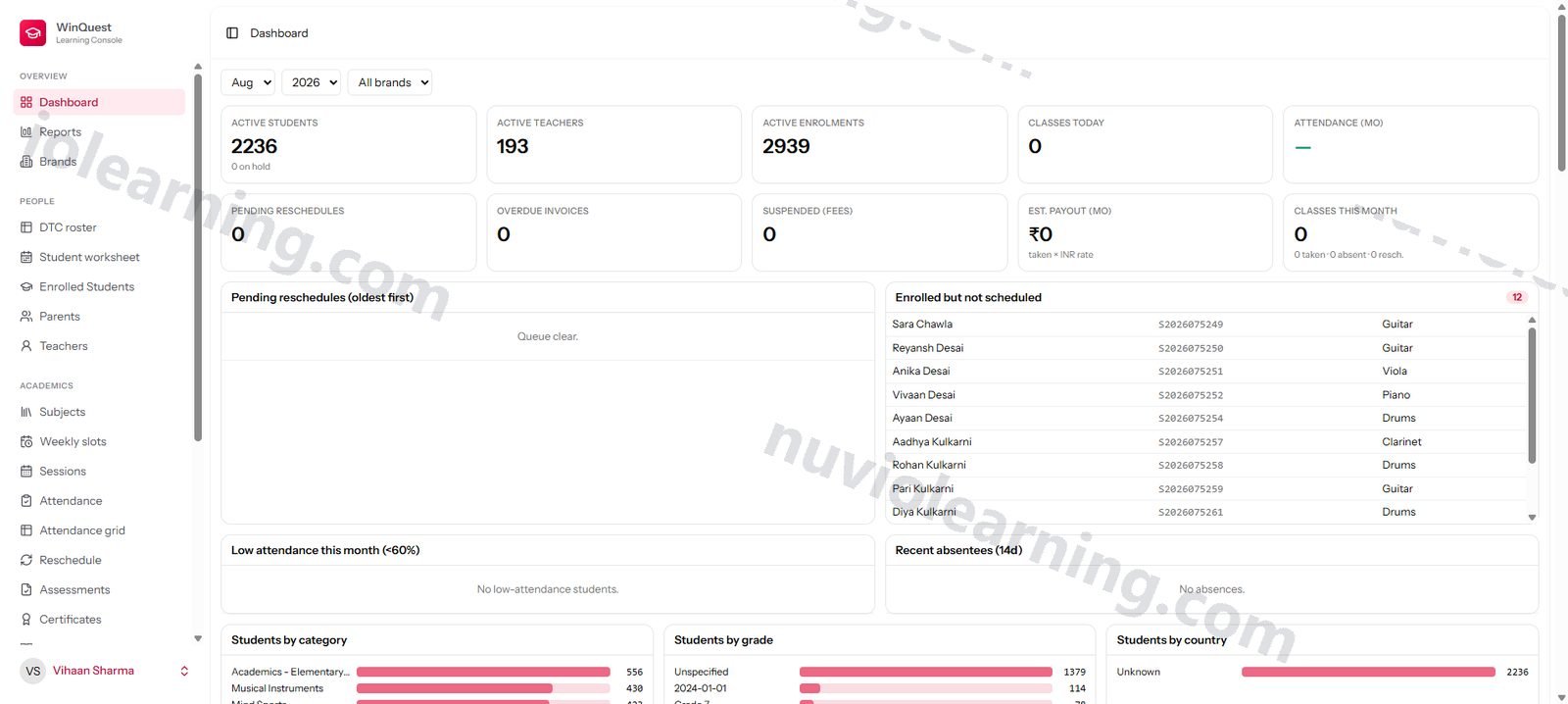
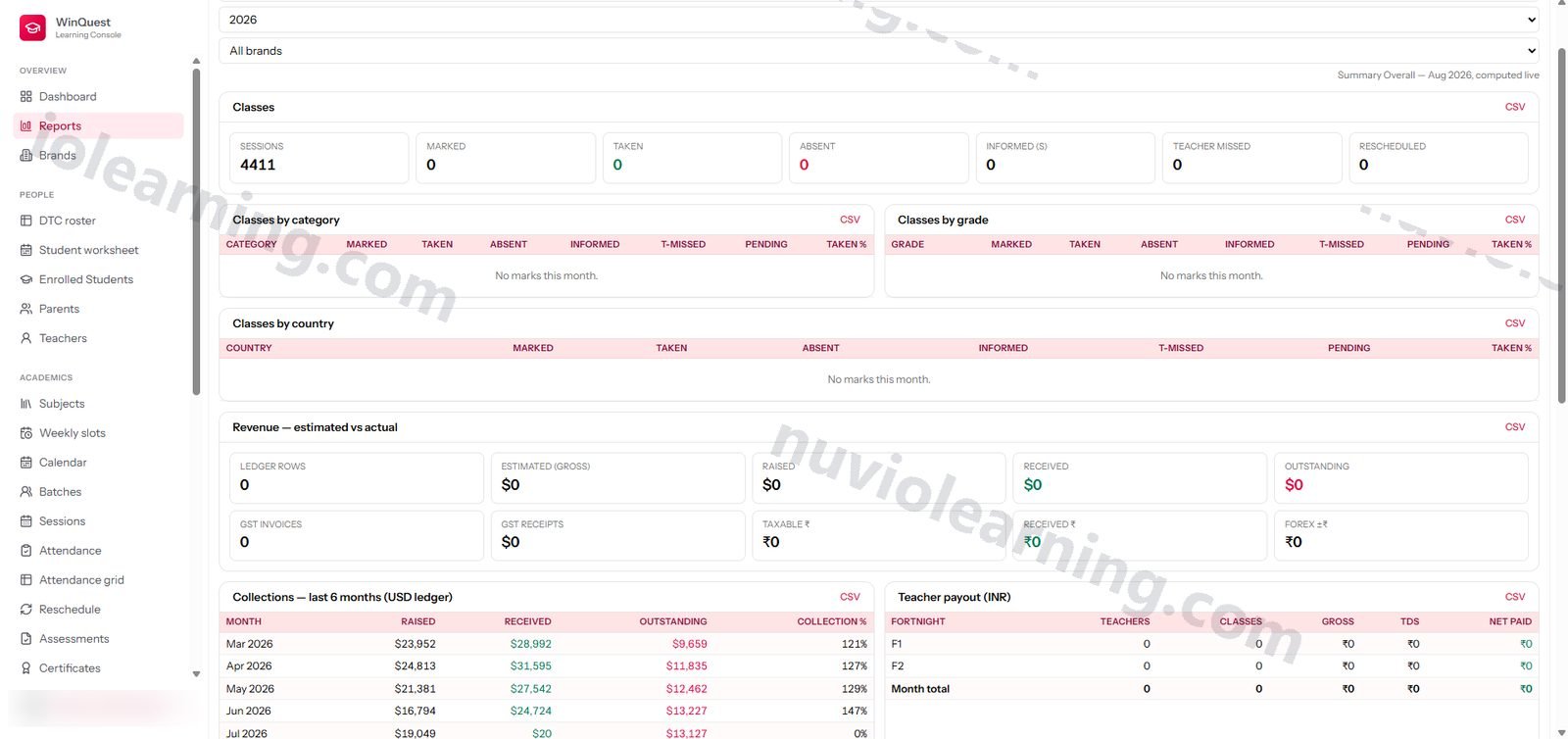
Real screens from Nuvio Learn
Pay for what you use. Nothing more.
A flat monthly price with a generous allowance included (100 active students included). Small team? You pay just the base. Growing? It grows with you, transparently.
₹3,499 / $54 · per month
- Classes & timetable
- Attendance
- Parent & teacher portals
- Fee ledger & teacher payouts
₹5,999 / $72 · per month
- Classes & timetable
- Attendance
- Parent & teacher portals
- Fee ledger & teacher payouts
- PTM & feedback
- Learning paths
- Exams & certificates
- Reports
Let’s talk
- Classes & timetable
- Attendance
- Parent & teacher portals
- Fee ledger & teacher payouts
- PTM & feedback
- Learning paths
- Exams & certificates
- Reports
- White-label student app
- Custom integrations
- Scale onboarding
Annual billing saves 20%. Bundles save more — see full pricing. Compare all plans →
Every feature in Nuvio Learn
Full transparency: all 19 modules and 123 features. Open any module to see everything inside it.
01 Student Roster & People Management · 11 features
A single canonical register of students, parents, and teachers with suite-wide S/P/T person codes, lifecycle states, and Excel-style master worksheets.
Student register with lifecycle states
Every student carries a full profile (grade, country, state, city, timezone, join date) plus a managed lifecycle — transition students between active, hold, and inactive states with reasons, and every transition is recorded as a lifecycle event.
Canonical STU numbering
Students get sequential STU-series IDs, pool-allocated and reconciled weekly against the CRM so the same student number is canonical across the whole suite.
S/P/T person codes
Students, parents, and teachers each carry a suite-wide person code, so records line up across CRM, HRMS, and Books without ambiguity.
Guardian (parent) management
Parents are first-class records linked to their children, with portal login credentials, email, and timezone, and full CRUD from the staff console.
Teacher profiles with competency and location
Teachers carry subjects taught, grade competency, country/state/city, timezone, default rates, TDS rate, and payment frequency — everything needed for matching and payroll.
Eligible-teacher matching engine
Find the right teacher for any student in one call: hard-filtered by subject and grade competency, ranked by location proximity (city > state > country), with an optional strict-location mode.
DTC master worksheet
The dense operations grid — one row per student with their courses (subject × teacher × weekly slots) nested beneath, searchable across student, parent, subject, and teacher, groupable by category or weekday, and exportable to CSV.
Continuous student worksheet
A month-by-month identity → attendance → fees view per student, reproducing the continuous-tracking sheet operators already know.
Active-roster reconciliation
Dry-run and apply commands diff the live roster against the source-of-truth active flags, deactivating students and idle teachers safely with a preview before commit.
Enrolment-status segmentation with CRM sync health
The students page gates the register into enrolled / unallocated / CRM-sourced views with live counts per segment and a visible CRM sync-status indicator (last cursor), so operators instantly see which children are active, which are unplaced, and which arrived from the CRM (StudentController + EnrolledGateTest).
Timezone normalization on input
Raw timezone strings from sheets, imports, and the CRM (abbreviations, aliases) are resolved to valid IANA timezone ids and junk values are rejected at save time (app/Support/Timezone.php, TimezoneHandlingTest) — a real data-hygiene feature for a global-student product.
02 Courses, Subjects & Enrolments · 5 features
A structured subject taxonomy and enrolment records that carry the commercial terms — student rate and teacher rate — for every course a student takes.
Subject catalog with 12-category taxonomy
Subjects roll up into categories and 4 top-level groups (seeded from the real operating taxonomy), powering grouped reporting everywhere in the app.
Smart subject resolver
Free-text course names from imports and integrations are canonicalized to the right catalog subject automatically, so data stays clean without manual mapping.
Enrolment records with commercial terms
Each student-subject-teacher enrolment stores the student's fee rate and the teacher's INR pay rate, with start/end dates, end reasons, and a clean end-of-enrolment flow.
Teacher rate auto-fill from CRM rate cards
New enrolments resolve the teacher's pay automatically from the CRM rate card (by subject, grade, music grade, class mode, and exact group size) — no manual rate lookups.
Automatic group repricing
A scheduled job reprices group enrolments every six hours against the batch's live roster size, so a group that grows or shrinks starts paying the correct rate band the same day.
03 Scheduling & Calendar · 6 features
Weekly recurring slots project themselves into dated sessions automatically, with a calendar view and Google Calendar + Meet links created for you.
Weekly slot timetabling
Define each student's recurring weekly class slots (day, time, teacher, subject) once; the system does the rest.
Automatic session generation
A daily idempotent job projects dated class sessions 28 days ahead from active slots — the schedule is always materialized and never double-created.
Calendar view
A full calendar of upcoming and past sessions across the institute, filterable by the usual dimensions.
Ad-hoc sessions and cancellations
Create one-off sessions or cancel scheduled ones with reasons, without disturbing the recurring pattern.
Google Calendar + Meet integration
Connect a Google account in Settings and a nightly sync creates calendar events with Meet links for upcoming sessions, updating event times when sessions move.
Schedule integrity repair
A guarded repair command detects and fixes slots or sessions whose end time lands before their start, dry-run by default.
04 Group Classes (Batches) · 7 features
A full group-class module: coded batches with rosters, join/leave history, one-screen group attendance, parent messaging, and live headcounts shared with the CRM.
Batch management with group codes
Create group classes with their own identity codes, level, subject, teacher, and trial/active flags.
Roster with join/leave history
Add and remove students from a batch with joined/left timestamps preserved, so historical membership is never lost.
Group attendance console
Mark an entire group session's attendance from one screen in a single submit.
Batch session generation
Generate the batch's dated sessions on demand from its schedule.
Message the whole group
Email every guardian on the active roster in one action, with per-recipient failure logging and an audit entry.
Roster CSV export
Download any batch's roster (including joined/left dates) as a CSV.
Hourly group sync to CRM
The group list with current headcounts is pushed to the CRM every hour, so coordinators placing demo students always see which groups have room.
05 Attendance & Class Policy Engine · 6 features
Fast attendance capture backed by a policy engine that turns every mark into its money meaning — who gets charged, who gets paid, who earns a makeup.
Attendance matrix
A month-at-a-glance grid of students × dates for rapid marking, alongside per-session and bulk marking flows.
Rich status vocabulary
Statuses distinguish taken, rescheduled-taken, absent, student-informed, teacher-missed, and pending — mirroring how real academies actually track classes.
24-hour-notice policy engine
Each mark is evaluated against the tenant's cancellation policy: informed in time means no charge and a makeup; late notice or a no-show is billable and payable; teacher cancellations charge no one — all configurable per tenant.
Goodwill charge waiver
Operators can waive the student charge on any mark while still paying the teacher, with the discretion recorded.
Period locking
Lock a completed attendance period so finalized data feeding billing and payroll can't drift; unlock is a deliberate, separate action.
Teacher session records (learning path)
Teachers log what each class covered, homework assigned, class marks, and achievement notes — building a per-student learning path parents can see.
06 Reschedules, Makeups & Extra Classes · 4 features
Missed classes automatically enter a makeup queue with an offer/accept workflow, so no entitled makeup ever falls through the cracks.
Automatic makeup queue
Makeup-eligible attendance marks (per the policy engine) automatically create reschedule requests — no one has to remember.
Offer and accept workflow
Staff propose makeup slots; accepting an offer books the replacement session automatically, declining keeps the request open, and skip closes it.
Extra classes
Record additional classes outside the regular schedule, kept distinct for billing and payout purposes.
Historical import
Legacy reschedule and makeup records import cleanly into the same queue with a reconciliation report.
07 Student Fee Ledger (USD) · 6 features
The live monthly USD fee ledger — opening balance, classes scheduled, fees raised, received, and closing — recomputed from real data instead of hand-copied cells.
Monthly per-student ledger
Every student gets a monthly row of rate, opening balance, scheduled classes, gross, makeup adjustments, raised, received, payment-in-hand, refunds, classes taken, and closing balance.
Excel-style totals row
Column totals recompute across the entire filter set — not just the visible page — so the ledger always reads like the sheet it replaced.
Dues and advance filters
One click isolates students with outstanding dues or advance balances.
Full-month CSV export
Server-side CSV export of the complete filtered month for sharing or archival.
Per-student ledger drill-down
Open any student to see their full ledger history across months.
Sortable, searchable columns
Every ledger column sorts server-side; search spans student name and STU number.
08 Teacher Payouts & TDS (INR) · 6 features
Fortnightly INR teacher payout ledgers computed from payable attendance, with per-teacher TDS rates, net pay, and actuals tracking.
Fortnightly payout periods
Payouts run in F1/F2 half-month periods with a whole-month rollup, matching how the institute actually pays teachers.
Gross, TDS, and net per teacher
Each teacher's students, classes, gross INR, TDS percentage, TDS amount and net payable in one sheet — TDS from tracked actuals, with automatic fallback to the teacher's configured rate.
Pay-vs-attendance reconciliation
A drill-down compares payout figures against payable attendance marks, surfacing any drift between pay and the class-level source of truth.
Actuals reconciliation
Recorded actual payments, actual TDS, and net paid sit beside the computed figures so discrepancies surface immediately.
Payout CSV export
Export the period's full payout sheet (Teacher ID, students, classes, gross, TDS %, TDS INR, net) for the payment run.
Per-teacher payout history
Drill into any teacher for their complete period-by-period payout record with rate and frequency context.
09 GST Register & Tax Compliance · 6 features
A per-invoice GST register that produces the exact return-import file the accountant uploads — brand-wise, export-under-LUT aware, forex-reconciled.
Per-invoice GST register
Every invoice line carries the full compliance record: USD receipt, exchange rate, taxable INR value, CGST/SGST/IGST/CESS, place of supply, SAC code, and payment mode.
Return-ready export
The CSV export reproduces the GST return-import template column-for-column (65+ headings in the accountant's order) — upload it as-is.
Export-of-services under LUT
Built for SAC-9992 education exports under LUT, with export type, shipping bill fields, and financial-year invoice sequencing.
Forex fluctuation tracking
Receipt-date exchange rates, USD/INR transaction costs and forex fluctuation tracked per invoice, so USD collections reconcile to INR books.
Brand-wise registers
Filter and export the register per legal entity (brand), each with its own GSTIN and invoice prefix.
Amendments and cancellations
Cancelled documents and amendment references (original invoice number/date/GSTIN) are first-class fields, not footnotes.
10 Billing Exports & Automated Dunning · 6 features
Push-button billing feeds plus a hands-off dunning engine that pauses overdue students' schedules and reactivates them the moment they pay.
Billing export batches
Generate the monthly billing feed (per brand or all brands) as versioned, downloadable export batches — finance-role gated.
Configurable dunning thresholds
Each tenant sets overdue-days and outstanding-amount limits; the daily scan flags students who cross either.
Automatic schedule suspension
Dunning suspends the student, cancels future untaught sessions with an explanatory note, and records the action — all in one transaction.
Automatic reactivation on payment
When Books reports an invoice paid, the student is reactivated and their schedule regenerated without staff involvement.
Dunning notifications
Suspension and reactivation notices route through the suite's messaging service, degrading gracefully to logs if messaging isn't configured.
Invoice mirror
Invoice status from the invoicing system is mirrored locally, powering the parent portal's fee view and the dunning engine.
11 Reports, Dashboard & Analytics · 6 features
A month-at-a-glance reports pack and operations dashboard where every figure computes live from the underlying tables — nothing hand-copied.
Operations dashboard
Month KPIs at a glance: classes scheduled/taken/absent/rescheduled, attendance rate, estimated fortnight payout, open queries, pending approvals, and more — filterable by brand and period.
Summary Overall reports pack
The classic monthly summary rebuilt live: class statuses overall and by subject category, grade, and country; USD revenue (estimated vs raised vs received vs outstanding); INR actuals from the GST register.
Six-month collections trend
Raised, received, and outstanding tracked across the last six ledger months to show collections momentum.
Fortnightly payout summary
F1, F2, and whole-month payout figures inside the same report.
Churn visibility
Student churn computed from lifecycle data alongside the financials.
Finance-role gating
Revenue reports are restricted to Super Admin, Brand Admin, and Accountant roles.
12 Assessments, Certificates & Report Cards · 7 features
Exam scheduling with integrity checks and publishable results, board-exam and completion certificates, and a compiled per-student report card.
Exam scheduling
Create exam schedules per subject with dates and modes, then add students individually or in bulk.
Exam integrity checks
A pre-exam appearance/identity check gate: exams sit in integrity-pending until the check passes, with every check audited.
Grading and publishing
Record marks, totals, grades, and teacher comments, then publish results to make them visible in the parent portal — parents can add their own comment.
Missed-exam handling
Mark no-shows as missed so schedules stay truthful.
Board-exam support
Purpose-built import and tracking for ABRSM, Trinity, and RSL board-exam registers alongside internal assessments.
Certificates register
Track completion and board-exam certificates per student with type, status, and issue-date filters plus live status/type counts.
Compiled report card
A printable per-student performance report combining attendance %, syllabus coverage %, exam average, homework completion %, and the latest shared teacher feedback — with a parent-safe version that only includes shared feedback.
13 Learning Content, Syllabus & Homework · 6 features
A learning library with per-student allocation, syllabus coverage tracking, and a full homework assign–submit–review loop across staff and portals.
Content library
Upload and organize learning materials with secure, access-controlled downloads for staff and students.
Targeted content allocation
Allocate any item to specific students or batches — and revoke it — so learners see exactly what's meant for them.
Teacher content authoring
Teachers add materials directly from their own portal.
Syllabus topic management
Define syllabus topics per subject and maintain them from the console.
Coverage tracking
Mark topics covered per student (from console or teacher portal) and view coverage progress — the same coverage % that feeds report cards.
Homework lifecycle
Assign homework, students submit files through their portal, teachers review with feedback — statuses tracked end to end with completion rates rolled into reporting.
14 Feedback, PTM & Parent Communication · 5 features
Structured monthly feedback with an explicit share-to-parent step, PTM scheduling with Meet links, and quick feedback notes.
Monthly feedback tracker
Teachers submit structured monthly feedback per student — rating, strengths, areas to improve, overall note — tracked by period so gaps are visible.
Deliberate share-to-parent step
Feedback stays internal until explicitly shared, giving staff a review gate before parents see it.
PTM scheduling
Schedule parent-teacher meetings with timezone, mode, Meet URL or location, and agenda; track scheduled vs held.
Quick feedback notes
Lightweight dated notes per student for observations that don't need the monthly structure.
Email nudge campaigns
Scheduled email nudges remind about tomorrow's classes daily, chase pending feedback monthly, and flag low-attendance students weekly with a configurable threshold.
15 Queries, Approvals & Change Control · 6 features
A built-in helpdesk for parents and students plus a formal approval workflow so sensitive changes (like fees) never happen silently.
Query threads with attachments
Parents and students raise typed, categorized queries with file attachments; staff reply, assign owners, and track status to resolution.
Cross-portal replies
The same thread is visible and replyable from the staff console and the parent or student portal, with secure attachment downloads.
Change-request workflow
Structured requests (teacher change, schedule change, fee change, and more) move through approve, reject, and revert — each action audited with who and when.
Fee-change protection
Fee-entity approvals are gated to accountant/admin roles even where coordinators handle everything else.
Attendance dispute flow
Parents can dispute recent attendance marks straight from the portal, creating a trackable change request.
Approval audit trail
Every approval decision is stored as an audit record attached to the request.
16 Parent, Student & Teacher Portals · 5 features
Three separately-authenticated self-service portals so every stakeholder sees their own slice — no staff time spent relaying information.
Parent portal
One login shows all children: upcoming classes (14 days), recent attendance, invoices, published exam results and upcoming exams, the class-by-class learning path, shared feedback, PTMs, queries, change requests, and downloadable report cards.
Student portal
Students see their schedule and homework, submit homework files, download allocated content, and raise their own queries.
Teacher portal
Teachers mark attendance, record what each session covered, submit monthly feedback, assign and review homework, add content, mark syllabus coverage, and manage their availability.
Separate auth guards per portal
Each portal runs on its own authentication guard and tenant context — staff, parent, student, and teacher sessions never blur.
Exam result comments
Parents can respond to published exam results with their own comment, closing the loop with the teacher.
17 Multi-Brand, Multi-Tenant & Access Control · 9 features
Brands as real legal entities, tenant-scoped data everywhere, a 7-role permission matrix, and full audit logging.
Brands as legal billing entities
Each brand carries its own legal-entity details, GSTIN, LUT, and invoice prefix — and every financial screen filters by brand.
Multi-tenant architecture
All data is tenant-scoped at the model layer, with per-tenant policy configuration (attendance rules, dunning thresholds) and per-tenant API keys.
Role-based access control
Seven roles (Super Admin, Brand Admin, Lead Coordinator, Accountant, Front-desk, Marketing Person, Lead Monitor) map to a view/manage permission matrix per module, kept in sync across tenants.
Finance-gated screens
Fee ledger, payouts, GST register, billing, and reports are locked to finance roles by route middleware.
User administration
Create staff accounts, assign roles, and disable users from a settings console.
Suite SSO
Staff can sign in through the suite identity provider with a state-nonce-protected code exchange.
Audit logging
Enrolments, attendance, approvals, payouts, dunning actions, exam decisions, and batch messages all write structured audit entries.
Entitlement-aware gating
Business surfaces sit behind a suite entitlement gate, while logout and account settings deliberately stay reachable so no one is ever locked in.
Staff account self-service
Beyond admin-managed users: staff have their own profile edit/delete, password change with current-password confirmation, forgot-password email reset flow, throttled email verification, and a light/dark appearance setting (routes/auth.php, routes/settings.php) — deliberately kept reachable even when the tenant's entitlement is off.
18 Integrations, API & Webhooks · 13 features
A machine API with per-tenant keys and HMAC-signed mutations, outbound webhooks with delivery tracking, and purpose-built connectors to the rest of the Nuvio suite.
API key management
Issue and revoke scoped per-tenant API keys from the settings console; mutations require an HMAC signature on top of the bearer key.
Outbound webhooks
Register webhook endpoints, toggle or delete them, with deliveries tracked per event.
Event stream API
A polling events endpoint gives any consumer a reliable feed of domain events (enrolments, dunning, and more) as a webhook fallback.
CRM lead-converted intake
When the CRM converts a lead, the student arrives in Learn automatically through a signed intake endpoint.
15-minute CRM identity sync
An incremental, cursor-based sync pulls enrolled-student identity from the CRM every 15 minutes; a weekly reconciliation adopts CRM student IDs and pushes contact fills back.
Books financial push
Push GST-register invoices and raw payout inputs to Nuvio Books per brand — dry-run by default, idempotent upserts, and a cutover-date guard so historical months are never overwritten.
Books paid-invoice webhook
HMAC-verified invoice.paid events update the local mirror and auto-reactivate dunning-suspended students.
HRMS teacher feed
A read API exposes teacher identity and reliability data for the HRMS register sync.
Messaging via the suite chat service
Dunning and operational notifications send through the FlowEngine messaging service, with delivery receipts posted back into a message log.
Nightly database backups
Automated dumps with configurable retention rotation and optional off-server copy.
Complete legacy Excel migration
Fifteen import commands load every legacy sheet — roster, attendance grids, USD fee ledgers, payout ledgers, GST registers, exams, certificates, feedback, reschedules, group classes — with dry-run previews where destructive.
Group-classes read API
In addition to the hourly push, GET /api/v1/groups is a pull surface exposing group list + current headcounts (counts only — the roster never leaves the app) for the CRM's demo group picker (routes/api.php:35, GroupsController).
WhatsApp + email dual-channel messaging
The FlowEngine client sends on either channel ('whatsapp' | 'email'), not just generic notifications — worth naming since WhatsApp reach is a selling point (app/Services/FlowEngineClient.php:20-21).
19 Newly shipped · 3 features
Fresh capabilities from the latest platform release.
Group classes end to end
Batches get a real identity: roster built from enrolments, weekly schedules, sessions and attendance, group codes minted from the subject, and a teacher view showing every group they run and who is in it.
Live group-size teacher pay
Group-class teacher pay is computed from the CRM rate card at the batch's live size — current students, not a stale roster — with a coverage report flagging group enrolments still missing a payout rate.
Attendance-driven billing feed
Class consumption flows from attendance straight into Books' consumption ledger, so what gets billed reflects classes actually delivered.
What changes when you switch
| Spreadsheets & typical tools | Nuvio Learn | |
|---|---|---|
| Where your daily records live | Spreadsheets work until they don't — the same student lives in five sheets, and one wrong copy-paste quietly breaks the fee ledger. | One live system: mark attendance once and the schedule, fees, and payouts all update from that one mark. |
| Fees and teacher pay | Most tools track either fees or payroll, so someone still reconciles the two by hand at month-end. | The fee ledger, fortnightly teacher payouts with TDS, and the GST register are computed from real class data in one app. |
| Built for education, or built for everything | General business suites like Zoho are powerful, but education depth like demo scheduling and teacher rate cards typically needs heavy customization (Zoho One also expects you to license every employee on its standard plan). | Enrolments, makeup queues, teacher rate cards, and fee ledgers with GST and TDS are built in — it already speaks academy. |
| Keeping parents informed | WhatsApp-only tools like AiSensy handle broadcasts well, but they are a messaging channel, not a system of record — no attendance, fees, or results behind the message. | Parents get their own portal — classes, attendance, results, fees, report cards — plus WhatsApp and email notifications through the suite. |
| Missed classes and makeups | Usually a judgment call remembered (or forgotten) by whoever answers the phone, with disputes settled from memory. | A policy engine applies your 24-hour-notice rule to every mark and auto-queues entitled makeups until they happen. |
| GST and TDS paperwork | Global class-management tools rarely know what a GST register or Section 194J TDS is; the accountant rebuilds everything from exports. | The GST export matches the return-import template column for column, and TDS is computed per teacher every fortnight — India-first by design. |
| When you grow to a second brand | Typically a second copy of everything: another spreadsheet set, another subscription, another reconciliation. | Brands are first-class legal entities with their own GSTIN and invoice prefix — add one and every financial screen filters by it. |
Nuvio Learn connects outward
Nuvio CRM (Leads): lead-converted intake, 15-min student identity sync, weekly STU-id adopt + contact push-back, teacher rate-card resolution for auto-pricing, hourly group-class push for demo placement
Nuvio Books: per-brand push of calculated invoices and payout inputs (dry-run-safe, idempotent), invoice.paid webhook that mirrors fee status and auto-reactivates suspended students
Nuvio Chat (FlowEngine): dunning and operational notifications with delivery-receipt callback into a message log
Nuvio HRMS: read API exposing teacher identity and reliability for the HR register sync
Suite SSO: staff sign-in via the shared identity provider with per-tenant app entitlements
Google Calendar + Meet: nightly sync creates calendar events and Meet links for upcoming sessions
Legacy billing feed: monthly winfree teachers_data export batches, downloadable per period
Generic consumers: per-tenant API keys with HMAC-signed mutations, outbound webhooks with delivery tracking, and a polling events API
Questions people actually ask
Do I need to install anything?
No. Nuvio Learn runs in your web browser — the same one you use today. Your staff, teachers, students, and parents each sign in with their own login from any device. There is nothing to install or maintain on your computers.
What happens to my Excel data?
It comes with you. Learn was built by replacing a real 5-sheet Excel operation — roster, attendance, fee ledger, payouts, GST register — and it has 15 import commands that load exactly those kinds of sheets. Every risky import shows you a preview before anything changes. 2,236 real students were migrated this way.
Will my accountant have to change how they work?
No — that's the point. The GST register export reproduces the return-import file your accountant already uses, column for column, including export-under-LUT and amendment fields. Teacher payout sheets export with gross, TDS, and net per teacher, ready for the payment run.
Can parents see fees and results without calling us?
Yes. Each parent gets one login covering all their children: upcoming classes, recent attendance, invoices, published exam results, shared teacher feedback, and downloadable report cards. Feedback stays private until you choose to share it, so nothing reaches a parent before you've reviewed it.
What does it cost, and what if I grow past my plan?
Starter is Rs 2,499 ($30) per month and includes 50 active students with classes, timetable, attendance, and the parent and teacher portals. Growth is Rs 5,999 ($75) per month for 150 students and adds the fee ledger, teacher payouts, PTM and feedback, learning paths, exams and certificates, and reports. Extra students are simply billed per head — Rs 40 each on Starter, Rs 30 on Growth — so growing never blocks you. Enterprise adds a white-label student app, custom integrations, and onboarding at scale.
Nuvio Learn works better with…
The fee ledger feeds Books per brand — branded invoice, pay link and bank reconciliation, no re-entry.
Explore Nuvio Books →Payable marks flow into payout workings; HRMS carries the TDS section so payroll reconciles downstream.
Explore Nuvio HRMS →Teacher rates auto-fill on enrolment from the rate cards HR maintains — subject, grade, group size, mode.
Explore Nuvio Leads →Try Nuvio Learn on your real work
15 days free. No card. We load your data with you, so the trial runs on your business — not demo data.