
Answer everyone, everywhere — from one inbox
Nuvio Chat puts WhatsApp, SMS, MMS, RCS, voice and email — plus the chat widget on your website — into one inbox. An AI helper answers routine questions day and night, saves every enquiry as a lead, and your team handles the rest.
- One inbox for 6 channels — WhatsApp, SMS, MMS, RCS, voice and email, plus the chat widget on your website
- An AI helper that answers customers even at 2am, using your own information — never made-up answers
- Every enquiry saved automatically as a lead, tagged with the channel it came from and who owns it
15-day free trial · No card · We help you move your data
Start simple. Grow into the advanced stuff.
You don’t need to learn everything on day one. Here’s the honest path — what you’ll do in your first week, and what the app grows into.
Start simple
Connect your WhatsApp number and send your first message the same week.
| You want to… | How Nuvio does it | What you get |
|---|---|---|
| Connect your WhatsApp number | Meta's official Embedded Signup walks you through it on one screen — no developer needed. | Your business number is live for sending, with 1,000 conversations included on Starter. |
| Send an offer to your customers | The template sender lets you create Meta-approved messages with pictures and send them to a list you upload by CSV — a sample file shows the exact format. | Your whole customer list hears about the offer in one go, not one forward at a time. |
| See what actually landed | Campaign reports show every message as sent, delivered, read or failed. | You know exactly who saw it — no guessing. |
| Answer the replies | Every reply to a broadcast flows back into the shared inbox, so campaigns turn into conversations. | One screen for replies instead of three phones. |
Run the day
Make the inbox your team's daily home, with clean lists and nothing forgotten.
| You want to… | How Nuvio does it | What you get |
|---|---|---|
| Catch every enquiry in one place | The unified lead inbox collects enquiries from every channel and stamps each with its source and owner. | Nothing warm slips away, and you can see who is responsible for each one. |
| Clean up your contact list | Phone numbers are checked against live carrier data (Twilio Lookup) and emails get a 3-stage check for typos and dead mail servers, with one-click cleaning. | You stop paying to message numbers that no longer exist. |
| Respect every 'stop' automatically | A central opt-out registry blocks the send at the last moment, on every channel. | One 'STOP' reply is honoured everywhere, forever — no awkward repeat messages. |
| Schedule the big send and walk away | Scheduled campaigns go out in throttled batches that resume themselves. | Large sends respect WhatsApp's limits and finish without anyone watching. |
| Share the work with your team | Four roles (owner, admin, manager, sender) and list assignment hand each person exactly what they should see and do. | Staff can send without being able to touch settings or other brands. |
Go advanced
Let AI do the first shift, and add SMS and email lanes — this is the Growth plan.
| You want to… | How Nuvio does it | What you get |
|---|---|---|
| Answer customers while you sleep | The Claude-powered chatbot works on your website and WhatsApp, mixing exact button menus (pricing, courses) with AI answers grounded in your own knowledge base. | Enquiries at 2am get real answers and are saved as leads — with the visitor's consent recorded. |
| Add SMS and email campaigns | The SMS console and a drag-and-drop email builder (no HTML needed) run alongside WhatsApp, with one-click unsubscribe built in. | Three outbound lanes from one login instead of three separate tools. |
| Reply to emails in half the time | Incoming emails each get an AI-drafted reply that waits in a queue — you approve, edit or redraft before anything sends. | Fast replies with a human safety catch; money topics are blocked outright. |
| Chase leads that went quiet | A watcher spots silent conversations and runs a polite WhatsApp-first follow-up, with AI deciding who is actually worth chasing. | Follow-ups happen on their own, only inside each contact's calling window. |
| Track every lead to the finish | Each lead carries a 9-stage pipeline from New to Enrolled, with per-channel work queues for calling, WhatsApp, SMS and email. | You see exactly where every enquiry stands — and who dropped the ball. |
Scale up
Put AI on the phone, run more brands and numbers, and plug into the rest of your stack.
| You want to… | How Nuvio does it | What you get |
|---|---|---|
| Let AI answer your phone | The conversational AI receptionist takes inbound calls, answers naturally with streaming speech, and transfers to a live person when needed. | No caller hears 'please call back during office hours' again. |
| Call whole lists automatically | The auto-dialer works through any list with answering-machine detection, recordings and per-country calling windows. | Your team and the AI only talk to humans, never to voicemail beeps. |
| Run more brands and numbers | Multi-brand workspaces keep each brand's number, contacts and campaigns fully separate — up to 3 numbers on Growth, bring-your-own WhatsApp at scale on Enterprise. | One console for all your brands, with each team seeing only their own. |
| Connect your other software | A bring-any-CRM connector with visual field mapping pushes leads out automatically, and a deployed MCP endpoint lets external AI agents use the platform's tools (Enterprise). | Leads flow into your CRM on their own — no copy-paste. |
| Send reminders without spamming | The notification service offers 14 ready-made event types — class booked, homework due, PTM invites — each routed to consented channels only. | Useful reminders go out automatically; fee and billing messages are blocked here by design. |
Real screens from Nuvio Chat
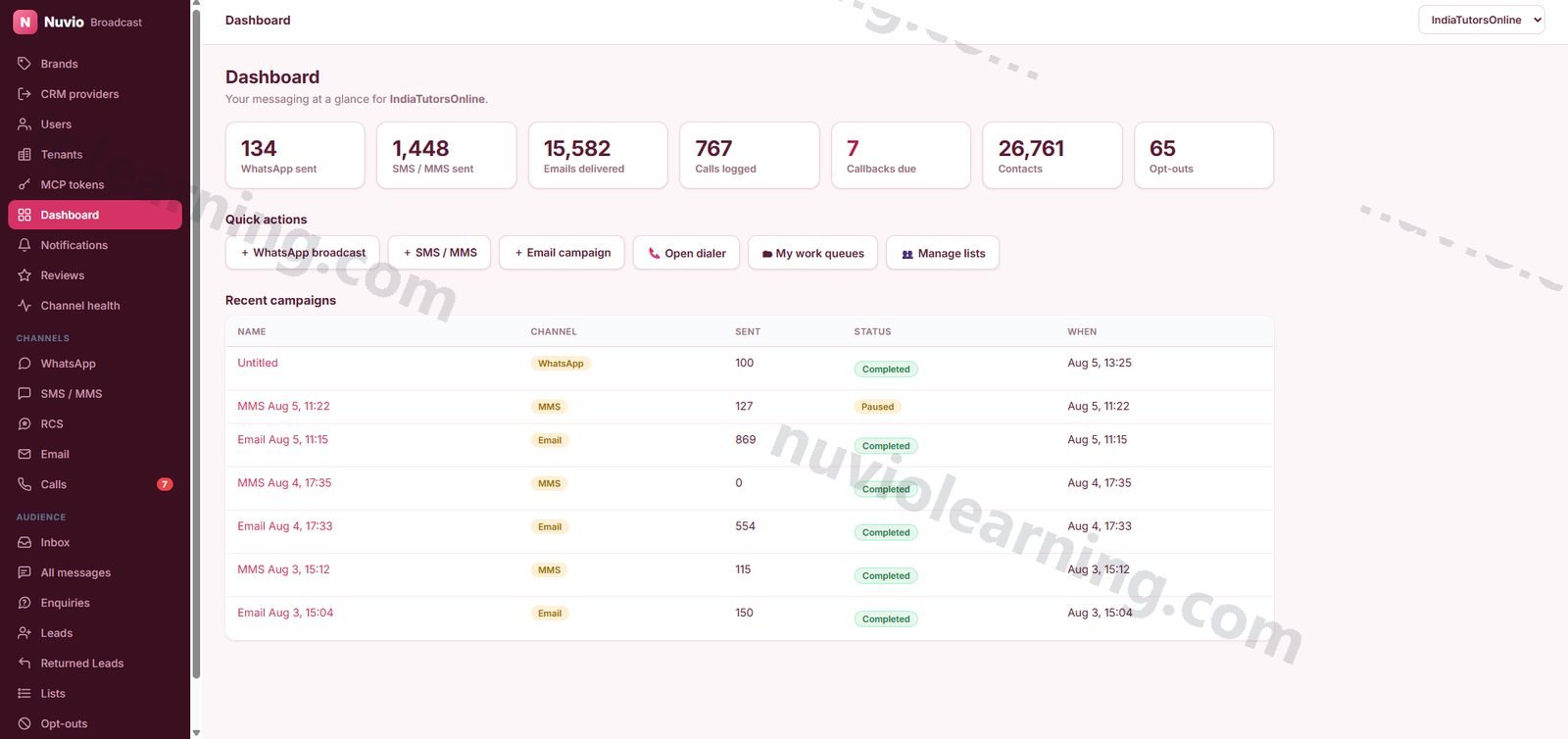
Pay for what you use. Nothing more.
A flat monthly price with a generous allowance included (1,000 conversations a month included). Small team? You pay just the base. Growing? It grows with you, transparently.
₹2,999 / $36 · per month
- WhatsApp inbox
- Message templates
- Broadcasts
- SMS, email & voice
- Campaigns
₹5,999 / $72 · per month
- WhatsApp inbox
- Message templates
- Broadcasts
- One number
- Flows & chatbot
- SMS, email & voice
- Campaigns
- Leads inbox
- Up to 3 numbers
Let’s talk
- WhatsApp inbox
- Message templates
- Broadcasts
- One number
- Flows & chatbot
- SMS, email & voice
- Campaigns
- Leads inbox
- Up to 3 numbers
- Bring-your-own WABA at scale
- MCP / API access
- Dedicated numbers
Annual billing saves 20%. Bundles save more — see full pricing. Compare all plans →
Every feature in Nuvio Chat
Full transparency: all 16 modules and 140 features. Open any module to see everything inside it.
01 AI Chatbot — Website & WhatsApp · 11 features
One Claude-powered conversation brain answers on an embeddable website widget and over WhatsApp, blending scripted flows with knowledge-grounded AI fallback and automatic lead capture.
Claude AI answers with RAG grounding
Every AI reply is grounded in your own knowledge base via retrieval, with prompt caching keeping per-conversation cost low.
Deterministic flow engine
Scripted flows with buttons, selectable lists and multi-step forms give instant, exact answers for pricing, catalog and enrollment — the AI only steps in when the visitor goes off-script.
Always-live menu navigation
Main-menu buttons keep working on every screen and a universal 'reset' escape hatch un-sticks any conversation instantly.
AI tool use (pricing & lead capture)
Claude calls real tools — country/grade/subject pricing lookup and consent-checked lead capture — so quotes are exact, never hallucinated.
Automatic lead capture with consent
The bot saves name, contact, country, timezone and course interest as a structured lead only after the visitor agrees to be contacted.
One-tap hosted enrollment form
The bot texts a single-use tokenized form link that works around WhatsApp Flow limitations and writes a clean lead on submit.
Embeddable no-dependency chat widget
A vanilla-JS widget mounted in Shadow DOM (host-site CSS can't break it) with configurable branding colors and a two-line embed snippet.
Full-page chat landing
A public /chat/start page gives email campaigns a 'Chat now' button that drops recipients straight into the bot.
Inactivity re-engagement
A scheduled watcher spots conversations that went quiet and runs a polite WhatsApp-first cadence, then up to a capped number of AI follow-up calls — opt-out aware and restricted to each contact's calling window.
AI-screened re-engagement qualification
Cheap rule filters plus a one-time Claude read of the thread decide who is worth chasing, with the verdict cached so no one is screened twice.
Human handoff / callback request from the bot
A global 'human' navigation option is live on every screen ('human' => 'callback' in the FlowEngine global nav), routing to a callback-request flow, and a 'handoff' flow action flags the conversation status to handoff so agents pick it up in the shared inbox. Evidence: FlowEngine.php line 56 and lines 226-227. A talk-to-a-human escape is a buyer-checklist item and is missing from the inventory.
02 Unified Omnichannel Inbox · 7 features
Every channel converges into one inbox via Chatwoot and the Meta Cloud API, with unified cross-channel threads and a single success-rate scorecard.
Chatwoot-powered shared inbox
Inbound WhatsApp messages flow through a signed Chatwoot webhook so the bot and human agents share full conversation context.
Direct Meta Cloud API webhook
A signature-verified Meta webhook tracks broadcast delivery (sent/delivered/read/failed) and forwards payloads so the inbox never misses a reply.
Multi-number webhook routing
Per-number routing across multiple WhatsApp numbers and WABAs keeps each brand's traffic in its own inbox.
All-messages console
One screen shows recent threads across web chat, WhatsApp, calls and the lead pool, grouped by person with their code, last activity and status.
Cross-channel analyser
A unified scorecard compares delivery and engagement success rates across every channel in one view.
Messaging policy pages
Built-in dos-and-don'ts, consent rules and the permanent opt-out policy keep every operator on the compliant path.
Pipeline stage mirrored into the shared inbox
When a lead's pipeline status changes, the linked Chatwoot conversation is automatically stamped with a stage:* label and flipped open/resolved (Archived/Closed/Lost resolve it), so inbox agents always see sales context without leaving the inbox. Evidence: App\Jobs\SyncChatwootStage.php (M6) dispatched from LeadsController update (~line 591) and ChatwootClient::pushPipelineStage. Absent from the inventory entirely.
03 WhatsApp Broadcast Console · 11 features
An AiSensy-class template sender and manager with scheduled campaigns, carousels, throttled delivery and per-brand WABA tenancy.
Template sender & manager
Create, manage and send Meta-approved WhatsApp templates with variables and media, straight from the console.
Carousel campaigns
Build multi-card WhatsApp carousel templates for rich product and course showcases.
Scheduled & throttled campaigns
Campaigns drain in throttled batches with auto-resume via cron, so large sends respect rate limits and finish themselves.
Campaign reports & analytics
Per-campaign delivery reports plus a console-wide analytics dashboard show exactly what landed, was read, or failed.
Follow-up campaigns
A dedicated follow-ups view targets prior recipients for the next touch.
Template media hosting
Send media is hosted and served to Meta automatically, per WhatsApp number.
WhatsApp link tool
A built-in wa.me link generator turns any number and message into a click-to-chat link.
CSV import with sample file
Upload recipients by CSV with a downloadable sample so formatting is never a guess.
Multiple WABAs per install
Owners can attach additional WhatsApp Business numbers, each isolated as its own brand.
Meta Embedded Signup onboarding
New brands connect their WhatsApp number through Meta's official Embedded Signup flow (Tech Provider program) — code exchange to connected brand in one screen.
Broadcast replies land in the inbox
Customer replies to any broadcast flow back into the unified inbox so campaigns turn into conversations.
04 Contact Lists & Data Hygiene · 7 features
Brand-scoped contact lists with industrial-grade cleaning: carrier-level phone validation, mailbox-level email checks and automatic number repair.
Contact lists with CSV import
Create unlimited lists per brand, import by CSV or add contacts one at a time.
Phone validation via Twilio Lookup
Validate an entire list against live carrier data before you spend a single send.
Email validation (syntax, typo, MX)
Three-stage email checking catches malformed addresses, common domain typos and dead mail servers.
One-click list cleaning
Purge invalid phones and emails from a list in one action, keeping deliverability high.
Free E.164 number repair
Automatically fix number formatting to E.164 without paying for lookups.
List assignment to agents
Hand a whole list to a team member's work queue for systematic outreach.
Central opt-out registry
Opt-outs from keywords, manual entry or API are stored centrally and enforced at send time on every channel.
05 SMS / MMS Console (10DLC) · 8 features
A2P SMS and MMS broadcasting over a Twilio Messaging Service with live delivery insights and automatic compliance handling.
SMS & MMS campaigns
Send text or media campaigns through a Twilio Messaging Service with number pooling and sticky sender.
SMS templates
Reusable message templates keep campaign copy consistent and fast to launch.
Live delivery insights
Pull real-time delivery diagnostics straight from Twilio to see exactly why messages succeed or fail.
Failed-send retry
Re-queue resendable failures in one click instead of rebuilding the campaign.
Delivery status tracking
Signature-validated Twilio callbacks record per-recipient delivery status automatically.
Multiple sending numbers
Owners can register additional sending numbers as capacity grows.
SMS analytics
Campaign-level analytics show sends, deliveries and failures at a glance.
Replies in the unified inbox
Inbound SMS replies land in the same Chatwoot inbox as every other channel.
06 Email Marketing Console · 11 features
Full campaign email over SendGrid: a drag-and-drop builder, deliverability tooling, warmup engine and event-level analytics.
Drag-and-drop email builder
Design responsive campaigns visually — no HTML required — and save them as reusable templates.
Email templates & image upload
A template library plus direct image uploads serve both the composer and the builder.
Test sends
Send any campaign to yourself first, before it goes near a list.
Scheduled campaigns
Queue sends for later; the cron drain fires them on time without anyone watching.
Open / click / bounce analytics
SendGrid's signed Event Webhook feeds real engagement data into per-campaign analytics.
One-click unsubscribe
Tokenized unsubscribe links honor list-unsubscribe standards and write straight into suppression.
Suppression sync
Pull SendGrid's blocks and bounces into the local suppression list so you never re-mail a dead address.
Non-engager pruning
One action suppresses recipients who never open, protecting your sender reputation.
Engagement send-guard
A database-level engagement guard keeps chronically unengaged addresses out of future sends.
Inbox warmup engine
Managed warmup seeds gradually build domain reputation before you scale volume, with per-seed toggle and tracking.
Domain-authenticated sending
DKIM/SPF-authenticated sending through SendGrid keeps campaigns out of spam.
07 Inbound Email AI Assistant · 5 features
Incoming email becomes an AI-drafted reply that a human approves before anything sends — automation with a safety catch.
Inbound email capture
SendGrid Inbound Parse turns replies to your campaigns into work items automatically.
Claude-drafted responses
Each inbound email gets a grounded draft reply generated by Claude, linked to the matched lead for context.
Human approval queue
Nothing sends until an operator approves or edits the draft — send, redraft, or discard per item.
AI redraft on demand
Ask for a fresh draft with one click if the first attempt misses the mark.
Money-topic hard block
The assistant is architecturally barred from discussing fees or payments, so finance conversations stay in your billing system.
08 Voice — Dialer, AI IVR & Auto-Dialer · 20 features
A complete cloud call center: in-browser calling, an AI receptionist, streaming voice AI and a throttled outbound auto-dialer with answering-machine detection.
In-browser WebRTC dialer
Agents place and receive calls from the console — no desk phone, just a browser and a Twilio token.
Agent presence & routing
An availability heartbeat routes inbound calls to whoever is actually online, with voicemail fallback when nobody is.
Screen-pop caller lookup
Incoming numbers are matched against contacts and leads so agents see who is calling before they answer.
Call dispositions & outcomes
Log every call's outcome in one click and feed the follow-up queues automatically.
Move-to-Leads from a call
Convert a live call into a lead with a popup — no retyping into another system.
Chatwoot-tagged calling sheets
Build calling lists straight from tagged inbox conversations, with an owner-set sheet label.
Call log, recordings & voicemail
Full call history with recordings and voicemails played back through a private, access-controlled audio proxy.
Recording consent whisper
An automatic announcement plays recording consent before capture starts.
Callback queue & follow-ups
A by-outcome follow-up view and callback queue make sure no promised call-back is dropped.
Call analytics dashboard
Volumes, outcomes and agent activity in one analytics view.
Outbound auto-dialer campaigns
Launch throttled auto-dial campaigns against any list, with per-campaign drain, progress view and a kill switch.
Answering-machine detection (AMD)
Async machine detection diverts machines to a voicemail drop so agents and AI only talk to humans.
Conversational AI IVR (inbound)
Point a number at the AI greeting and callers converse naturally with a Claude-driven agent that can transfer to a live human.
Streaming voice AI (ConversationRelay)
Twilio ConversationRelay streams speech both ways for low-latency, accent-robust AI conversations, gracefully falling back to the turn-based IVR.
Custom call flows + AI flow generator
Define per-campaign call scripts, or have AI draft a complete flow from a plain-language brief and Q&A.
Calling windows & timezone control
Campaigns and follow-up calls respect each destination's local calling window automatically.
End-of-call outcome mapping
AI call outcomes map automatically into leads and callback records — no manual after-call work.
Caller-ID verification
Verify new outbound caller IDs with an automated code key-in flow.
Per-flow voice knowledge packs
Beyond the global voice KB, config/voiceqa_flows.php holds per-flow Q&A packs with flow-specific system-prompt addendums (e.g. coding, music); when an auto-dial campaign maps to a subject flow, VoiceBrain folds that pack into retrieval so the phone AI answers with subject-specific depth instead of only generic facts. Not represented in the inventory.
Familiar-number and local-presence caller ID
Outbound AI calls prefer to originate from the number the contact already messaged with (a caller ID they recognise), falling back to local-presence caller-ID rotation across pooled numbers — including support for numbers held in secondary Twilio accounts, each request signed with that account's own auth token. Evidence: InactivityWatch.php callerIdFor (lines 147, 179) and VoiceController.php ~line 2717. Materially improves answer rates; absent from the inventory.
09 Cross-Channel Leads & Enquiries · 12 features
Every channel feeds one lead pool with automatic source tagging, ownership attribution, work queues and a CRM push — nothing warm ever slips away.
Unified lead inbox
Leads from the website chatbot, WhatsApp, SMS, email and calls live in one brand-scoped pool with full field-level detail.
Automatic source tagging & attribution
Each lead is stamped with its originating channel and the marketing person who owns it.
Claim, assign, archive, delete
Lightweight ownership actions keep the pool tidy and accountable.
Bulk actions & CSV export
Update many leads at once and export the pool to CSV whenever you need it elsewhere.
Manual lead entry
A create form captures walk-in or phone leads that never touched a channel.
One-click push to CRM/LMS
Send any lead downstream to the connected CRM with a single action — automatically or on demand.
Returned-lead follow-up loop
Leads the CRM sends back arrive in their own queue with notes, bulk actions and convert-back-to-lead.
Enquiries pipeline
Conversations that engaged the bot but never converted become assignable enquiries with their own status ladder (New → Contacted → Follow-up → Interested → Not reachable → Dropped) and a timestamped notes trail.
Enquiry-to-lead conversion
Promote any warm enquiry into a full lead in one click, keeping its whole history.
Per-channel work queues
Dedicated Calling, WhatsApp, SMS and Email queues let managers assign outreach and track notes, conversions and archives per item.
Full sales-pipeline status on every lead
Leads (not just enquiries) carry a 9-stage status pipeline that mirrors the downstream LMS stages — New, Contacted, Demo Done - Follow Up, Demo Done - Not Interested, Move to Coordinator, Enrolled, Not Interested, Lost, Archived — editable per-lead and via bulk move-to-status. Evidence: LeadsController::STATUSES (C:\Users\USER1\winquest-chatbot\service\app\Http\Controllers\LeadsController.php:26) and the bulk action at ~line 692. The inventory gives a status ladder only to enquiries and reduces lead actions to claim/assign/archive/delete.
Instant lead email alerts and visitor confirmation
Every captured lead fans out via a queued job that emails an internal notification to the team and a branded confirmation email to the lead themselves, in addition to the AiSensy sync. Evidence: App\Jobs\SyncLead.php (sendEmails) with App\Mail\LeadNotification.php and App\Mail\LeadConfirmation.php. The inventory mentions only the AiSensy sync from this job.
10 Notification Service · 7 features
A consent-first transactional notification hub: sibling apps raise domain events, a trigger matrix routes them to the right channel and template, and one log records every delivery.
Event intake API
A secret-gated endpoint lets other suite apps raise domain events (class booked, report shared, exam notice) without knowing anything about channels.
Non-money trigger matrix
Fourteen curated event types — welcomes, class and homework reminders, PTM invites, review prompts and more — each with a default channel set and consent scope.
Money-event hard block
Fee and invoice events are architecturally refused here, guaranteeing billing messages only ever come from your finance system.
Per-channel template registry
Register the exact template used per event, channel and brand from a console UI.
Opt-in consent per person per channel
Promotional messages require recorded opt-in; transactional service messages route only to consented channels.
Unified delivery log
One cross-channel log shows every notification sent, to whom, on which channel, with what result.
Scheduled retry engine
A minutely, claim-locked tick drains the outbox and retries transient failures idempotently.
11 Multi-Brand, Teams & Security · 8 features
True per-brand tenancy with bring-your-own WhatsApp credentials, a four-role permission matrix and a hardened, fail-closed security posture.
Multi-brand workspaces
Each brand has its own WhatsApp number, WABA and encrypted-at-rest API token, fully isolated from other brands' campaigns and contacts.
One-click brand switching
Operators with multi-brand access flip context instantly without logging out.
Role-based permission matrix
Owner, admin, manager and sender roles map to a per-capability, per-brand tick grid covering sending, templates, opt-outs, users and brands.
Signed webhooks across integrations
Chatwoot HMAC, Meta X-Hub-Signature-256, SendGrid signed events and Twilio signatures — every inbound callback is verified once its secret is configured.
Fail-closed console auth
The console refuses all access until its password is set, with brute-force throttling on login.
Baseline security headers
HSTS, X-Frame-Options, nosniff, Referrer-Policy and a conservative CSP wrap every single response.
Brand-scoped access control
IDOR-hardened queries ensure users only ever see their own brand's data.
Async job foundation
A database-backed queue with systemd worker and scheduler moves heavy sends off the request path, with automatic queue housekeeping.
12 Integrations & Developer Platform · 8 features
An MCP server, a bring-any-CRM connector framework and signed server-to-server hooks make Nuvio Chat the automation hub of your stack.
MCP server (agent-ready)
A token-authenticated Model Context Protocol endpoint (JSON-RPC 2.0, batch-capable) lets external AI agents call the platform's registered tools — lead capture and pricing today, and new tools appear automatically as they're registered.
Bring-your-own CRM connectors
Register any HTTP CRM with a visual field-mapping UI, test the connection per provider, and auto-push captured leads.
LMS/CRM server-to-server hooks
Signed endpoints let sibling apps trigger single-recipient transactional sends, submit WhatsApp templates to Meta for approval, and return leads for follow-up.
Website form intake with spam filter
A secret-guarded webform endpoint captures book-a-demo submissions with a lightweight bot filter, stores the lead and relays it downstream.
Student-ID pool proxy
A brokered ID-allocation endpoint lets the website replenish student-ID reserves without ever touching the system of record directly.
AiSensy CRM sync
Captured leads sync outward to AiSensy automatically via a queued job.
Suite entitlement check
A cached, fail-open client checks the Nuvio accounts backbone so suite licensing is enforced without ever risking console downtime.
Self-documenting capability inventory
An artisan command regenerates the client-facing capability document straight from the live route table, so docs can never drift from what's deployed.
13 RCS — Google Rich Business Messaging · 7 features
The premium Android channel: branded, verified sender with rich cards, carousels and tappable replies, billed per message rather than per SMS segment.
Verified branded sender
Messages arrive from your brand with its name, logo and colour, verified by Google, instead of an unknown number.
Rich cards and carousels
Send a swipeable carousel of courses, products or dates with images and buttons, in the messaging app itself.
Suggestion chips
Offer tappable replies and actions so a recipient answers with one thumb instead of typing.
Cached capability check
The platform checks whether a given handset can actually receive RCS before it sends, and caches the answer so the check costs nothing on a campaign.
Its own channel, not an SMS bolt-on
RCS has its own console section, template authoring surface and health dashboard, and is metered as its own unit.
Never silently downgraded
If a number cannot take RCS, the send fails loudly rather than quietly going out as a cheaper SMS and billing you for something you did not choose.
Carrier routing
Reaches Google RBM through a carrier partner, so Indian and international traffic can take different routes.
14 Tenant isolation & platform safety · 6 features
One deployment holds many brands in shared tables, so isolation is the platform’s most important correctness property rather than a configuration option.
Default-deny at the database boundary
A request-local tenancy context plus a global brand scope rewrite every tenant-owned query to the permitted brand set — application code cannot forget to filter.
Strict mode armed in production
A query that runs with no tenancy context returns nothing, not everything: the safe direction to fail in.
One sanctioned bypass
Cross-tenant reads go through a single explicit, greppable escape hatch rather than ad-hoc exceptions scattered through the code.
A second layer in the inbox
Inside the shared inbox, tenant agents hold agent-role accounts with per-inbox membership only, so isolation does not rest on one mechanism.
Context declared at every entry point
Console, webhook, cron, machine API, public token routes and queue jobs each establish their tenant context before any logic runs.
Signature-verified webhooks
Every provider callback is signature-checked, and secrets are injected at deploy rather than hand-edited on the server.
15 Usage metering · 4 features
The platform measures what you used, in the unit each channel is actually billed in — so a bill can be explained line by line.
Six metered units
Conversations, SMS segments, MMS, RCS messages, voice minutes and email sends are each counted per brand per period.
Conversations are the plan unit
Your plan allowance is counted in conversations; the per-channel units are carrier costs, kept separate so the two can never be confused.
Channel price-book
Per-channel usage is priced against a published price-book (carrier cost plus margin) rather than an opaque blended rate.
Measured, not self-billed
Usage is reported to the suite accounts backbone, which owns billing — the messaging platform never invoices you directly.
16 Newly shipped · 8 features
Fresh capabilities from the latest platform release.
India click-to-call with call recording
Coordinator browser dialer that routes India calls over Plivo and everything else over Twilio, with recording playback, cancellable ringing, inbound handling on the Indian line, and a built-in compliance gate against automated dialling to Indian numbers.
RCS as a first-class channel
RCS messaging selectable per brand alongside WhatsApp, SMS, MMS, email and voice — with no silent downgrade to another channel.
Channel health dashboard and cost pages
A live health dashboard across all six channels plus per-channel setup and cost pages, so teams see delivery status and spend at a glance.
Smart review invites
Google review invitations sent in the recipient's local daytime, cadence-guarded and click-tracked.
Re-engagement sequences
WhatsApp-first automated re-engagement for inactive contacts with capped call attempts, future-only scheduling guarantees, and NRI/abuse screening.
Email deliverability guard
Automatic suppression of never-openers, SendGrid block syncing, repeat-subject warnings and an engagement guard that protects sender reputation.
Enquiries capture and bulk push to CRM
Stalled bot conversations surface on an Enquiries page before they're lost, and leads can be bulk-assigned and pushed to the CRM in one action.
List management overhaul
Leads-style contact grids with full-column sort/filter, group-by tabs, select-all-across-pages, filterable segments, create-sublist for campaigns, and E.164 phone normalisation on upload with a repair tool for existing lists.
What changes when you switch
| Spreadsheets & typical tools | Nuvio Chat | |
|---|---|---|
| Channels covered | AiSensy is WhatsApp-only — independent reviews say businesses that also need email, SMS or web chat should look elsewhere. | WhatsApp, SMS, MMS, RCS, voice and email — plus the website widget — share one inbox, one contact record and one bot. |
| What the chatbot costs | On AiSensy, the chatbot builder is a ₹2,500/month add-on and the AI agent ₹3,500/month more, on top of the base plan. | Flows and the AI chatbot are included in the Growth plan at ₹2,999/month — no add-on stacking. |
| Where enquiries live | Spread across personal WhatsApp, notebooks and a spreadsheet — easy to forget, hard to hand over. | One lead pool; every enquiry saved automatically and tagged with its channel, owner and pipeline stage. |
| Opt-outs and consent | A 'please remove me' reply gets noted somewhere — and sometimes forgotten, which annoys customers. | A central opt-out registry blocks the send automatically on every channel, permanently. |
| Phone calls | A separate call-centre tool, or staff dialling from personal mobiles with no record of what was said. | Built-in browser dialer, recordings, an AI receptionist and an auto-dialer — same login, same lead history. |
| AI safety | Fully automated bots reply on their own; some 'AI' chatbots are described by reviewers as rigid templated responses. | AI answers are grounded in your own knowledge base, email drafts wait for human approval, and money topics are blocked from marketing channels. |
| Message charges | Per-message Meta charges are billed on top of the subscription from a prepaid wallet; markups vary by vendor. | Two clear buckets: Meta's own charges are Meta's, and our plan is a flat fee with a stated per-conversation overage (₹0.85 on Starter). |
Nuvio Chat connects outward
Wondering about the WhatsApp, SMS and email accounts behind this? Read the plain-English setup guides →
WhatsApp Business (Meta Cloud API)
per-brand WABA, templates, carousels, Embedded Signup onboarding, signed delivery webhooks
Chatwoot
signed webhook drives the bot and unifies all channels into one shared team inbox
Twilio Voice
WebRTC dialer, AI IVR, ConversationRelay streaming voice AI, auto-dialer, AMD, recordings
Twilio Messaging (10DLC)
SMS/MMS campaigns via Messaging Service with delivery callbacks and live insights
Twilio Lookup
carrier-level phone validation for contact lists
SendGrid
campaign sending, signed Event Webhook analytics, Inbound Parse, suppression sync, domain authentication
Anthropic Claude
the AI brain behind chat, voice IVR, email drafting, flow generation and re-engagement screening
Nuvio Leads (suite CRM)
lead push, returned-lead loop, and the shared accounts/entitlements backbone with SSO exchange
Nuvio Learn / Books / HRMS
raise domain events into the Notification Service over the secret-gated intake API
WinQuest LMS
signed hooks for transactional sends, WhatsApp template approval submission and the STU-id pool proxy
Any HTTP CRM
generic connector framework with field mapping, per-provider test and auto-push
AiSensy
automatic outbound lead sync
MCP (Model Context Protocol)
external AI agents call registered platform tools over JSON-RPC 2.0
Questions people actually ask
Do I need to install anything?
No. Nuvio Chat runs in your web browser. For your website's chat bubble, you paste a two-line snippet — that's it. It's built so your site's own styling can't break it.
What happens to my Excel contact lists?
You upload them as CSV files — a sample file shows the exact format. The system then checks every phone number against live carrier data, fixes formatting, catches email typos and dead addresses, and cleans the list in one click.
Do I need my own WhatsApp number?
Yes. Meta requires every business to verify itself — a number not tied to an existing WhatsApp account, plus a business document like a GST certificate or bank statement. That's Meta's rule whichever tool you pick. We guide you through it with Meta's official one-screen signup.
What do the messages actually cost?
Two separate things, kept deliberately apart. Your plan covers conversations and is what the pricing page quotes. On top of that the carriers charge for what actually goes out — WhatsApp conversations, SMS segments, MMS, RCS messages, voice minutes and email sends are each metered in their own unit against a published price-book, so a bill can be read line by line instead of as one blended number.
Nuvio Chat works better with…
The cross-channel inbox auto-tags source and owner, and every enquiry lands in the CRM deduplicated.
Explore Nuvio Leads →Send a Books pay link inside the conversation; the gateway webhook settles it into the ledger.
Explore Nuvio Books →Demo bookings, reminders and follow-ups reach parents on WhatsApp — threaded, templated, compliant.
Explore Nuvio Learn →Try Nuvio Chat on your real work
15 days free. No card. We load your data with you, so the trial runs on your business — not demo data.