
Never lose an enquiry again
Every call, WhatsApp message and website form lands in one list your whole team can see. Nuvio Leads walks each enquiry from first hello to enrolment — nothing falls through the cracks.
- One place for every enquiry — website, WhatsApp, chatbot, calls and walk-ins
- A simple pipeline that shows exactly where each family stands, from first enquiry to enrolled
- One-click WhatsApp and email follow-ups, with a full record of who said what and when
15-day free trial · No card · We help you move your data
Start simple. Grow into the advanced stuff.
You don’t need to learn everything on day one. Here’s the honest path — what you’ll do in your first week, and what the app grows into.
Start simple
Get every enquiry out of notebooks and phone screenshots and into one safe list.
| You want to… | How Nuvio does it | What you get |
|---|---|---|
| Write down every enquiry, even a half-heard phone number | The lead form plus a dedicated partial-lead screen capture incomplete enquiries so you can finish them later. | Nothing gets lost while you chase the missing details. |
| See where every family stands | A stage-tab pipeline moves each lead through Inquiry, Marketing, Coordination, Monitoring and Enrolled. | One glance tells you what needs attention today. |
| Book a demo class across time zones | Enter the time once and the dual-timezone demo engine shows both India time and the student's local time, with a ready-to-share Google Calendar link. | Daylight-saving changes can never shift a demo by an hour. |
| Catch a repeat enquiry before it becomes a mess | A live duplicate check asks 'have we met this family before?' while you are still filling the form. | Duplicates get caught before they are created. |
| See how the month went | Simple reports show enrolments in any date range, with the source and teacher behind each one. | You know what worked without building a single pivot table. |
Run the day
Make the everyday grind — calls, follow-ups, updates — fast and mistake-proof.
| You want to… | How Nuvio does it | What you get |
|---|---|---|
| Start each morning with a call sheet | One-click 'Demo: Today / Next Day / Yesterday' tabs filter the grid by each demo's calendar date. | Your morning to-do list builds itself. |
| Update a lead without opening a new page | Instant inline save lets you edit any cell right in the grid, like a spreadsheet. | A status update takes one click, not five. |
| Follow up after every single demo | Due, upcoming and done tabs make every past demo answer for itself — completed, no-show or cancelled — and completing one prompts the next step. | Bookings can never silently evaporate. |
| Respect people who said 'please stop messaging me' | A permanent opt-out gate checks every send path, matching people by every phone and email on file. | An opt-out is enforced forever, not just noted somewhere. |
| Undo a mistaken delete | Deleted leads go to a searchable archive with one-click restore. | A misclick never destroys a lead. |
Go advanced
Bring in your history, message at scale, and split the work across your team and brands.
| You want to… | How Nuvio does it | What you get |
|---|---|---|
| Move your old Excel sheets in | Bulk import validates every row, logs what was added or skipped, and holds broken rows in an errors lane for you to fix — never discards them. | Years of history come in without losing a single lead. |
| Message a parent in one click | A library of 50 ready-to-send WhatsApp and email templates fills in the parent, student, subject and demo time automatically. | A polished follow-up in seconds, no copy-paste errors. |
| Find anything, however big the list grows | Every column sorts and filters on the server, with popovers that list the actual values so filtering is a pick, not a guess. | Excel-style filtering that stays fast past what Excel can hold. |
| Sort duplicates out for good | Two-layer dedup auto-links only certain matches and queues fuzzy ones in a Duplicate Review sheet where merges are reversible. | In daily use it has never dropped a lead. |
| Run more than one brand from one login | Brand workspaces give each brand its own members, roles and defaults, switchable from the header. | Two academies, one system, no mixed-up data. |
Scale up
Let the system do the routing, connect your other tools, and see the whole funnel.
| You want to… | How Nuvio does it | What you get |
|---|---|---|
| Stop hand-assigning leads | A rules engine seats the right marketing person, coordinator and monitor on each lead automatically, choosing whoever holds the fewest leads. | Fair workload, and 'who had this lead when' is always answerable. |
| Connect your website and chatbot | One secure intake API accepts leads from any source, with per-workspace tokens and a ledger that stops a retry from creating the same lead twice. | Every enquiry from every channel arrives once, and only once. |
| Price every teacher without a rate spreadsheet | A rate card by subject, grade, group size and mode picks the right rate automatically and feeds the payout and HR apps live. | One rate change updates everywhere, instantly. |
| Let parents book their own consultation | Shareable public booking pages show real available slots, and every confirmation carries a private link to cancel or reschedule. | Bookings arrive while you sleep, no phone tag. |
| Sign in once across the whole suite | Suite SSO and per-workspace entitlements let staff hop between Leads, Learn, Books, HRMS and Chat with one login. | One identity, five apps, zero password juggling. |
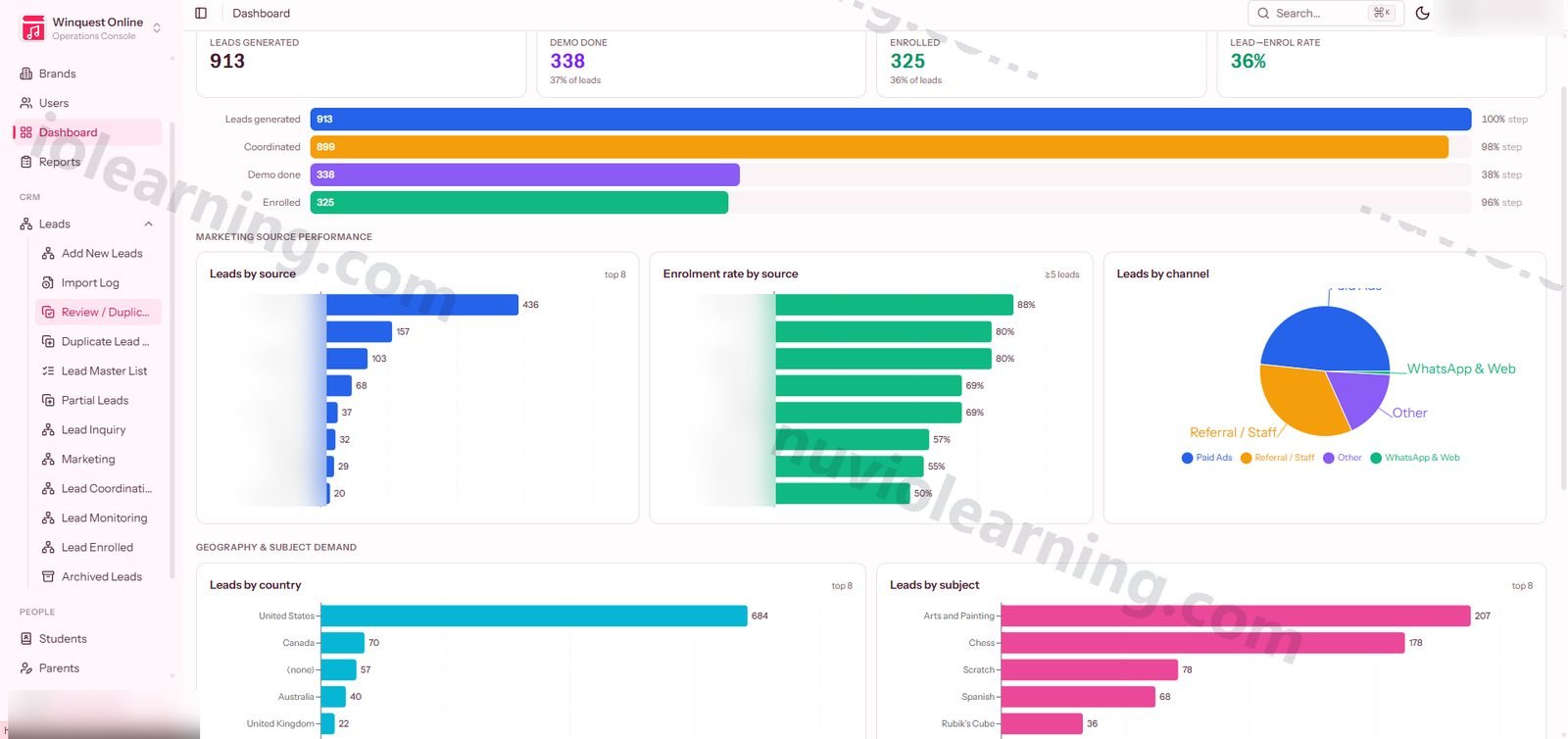
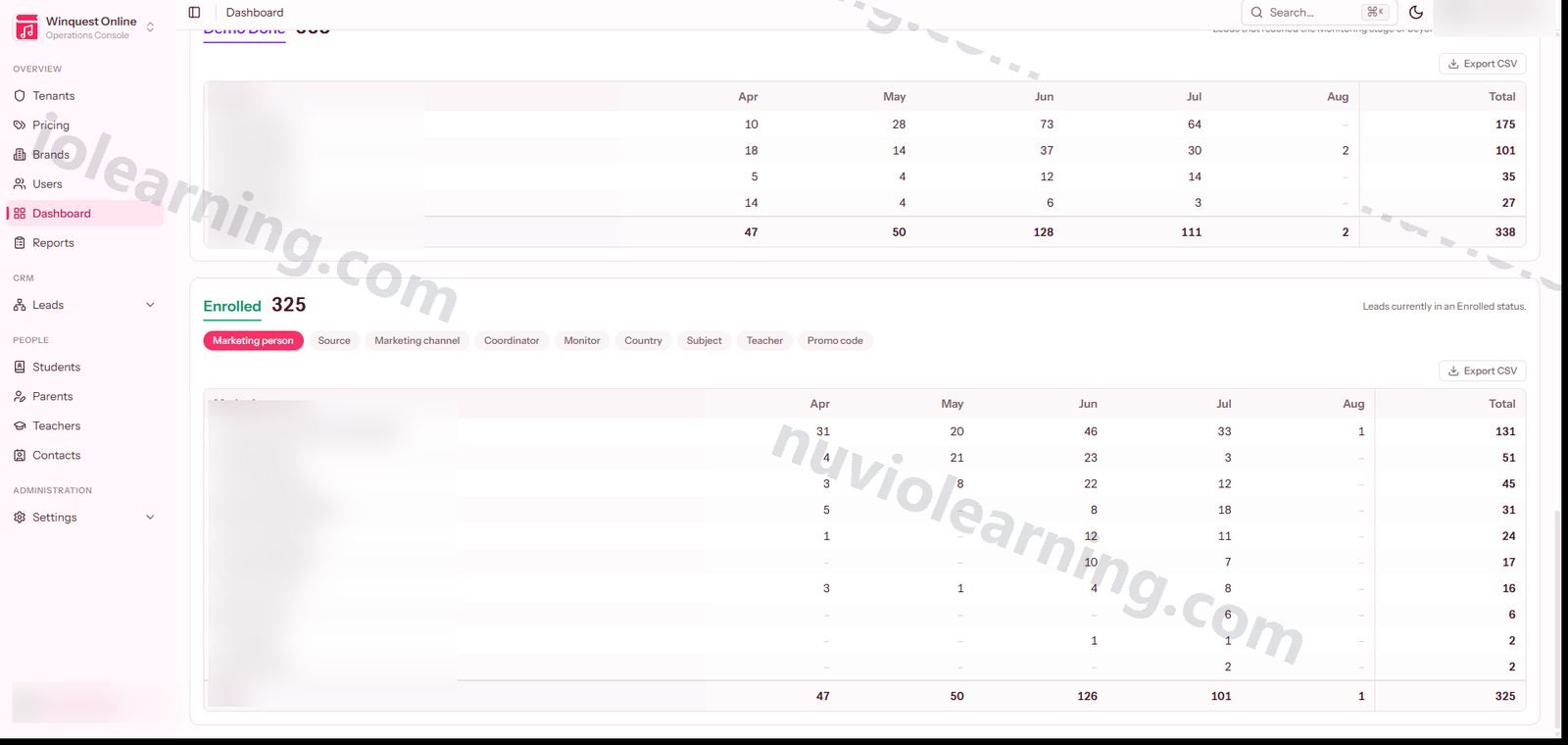
Real screens from Nuvio Leads
Pay for what you use. Nothing more.
A flat monthly price with a generous allowance included (2 users included). Small team? You pay just the base. Growing? It grows with you, transparently.
₹2,999 / $36 · per month
- Lead capture & pipeline
- Demo scheduling
- Basic reports
- Single brand
₹5,999 / $72 · per month
- Lead capture & pipeline
- Demo scheduling
- Basic reports
- Single brand
- Coordination lanes
- WhatsApp & email templates
- Bulk import
- All-column filters
- Multiple brands
Let’s talk
- Lead capture & pipeline
- Demo scheduling
- Basic reports
- Single brand
- Coordination lanes
- WhatsApp & email templates
- Bulk import
- All-column filters
- Multiple brands
- SSO & suite identity
- API access
- Custom routing rules
- Dedicated support
Annual billing saves 20%. Bundles save more — see full pricing. Compare all plans →
Every feature in Nuvio Leads
Full transparency: all 13 modules and 121 features. Open any module to see everything inside it.
01 Lead Capture & Intake · 12 features
One hardened front door for every lead producer — website, chatbot, WhatsApp, public booking page or manual entry — with attribution captured at the moment of arrival.
Universal intake API
A single token-guarded endpoint (POST /api/leads/intake) accepts leads from any external producer and creates them exactly like a staff entry — parent/student resolution, subject links, status history, lead number and auto-assignment included.
Per-tenant API tokens
Machine access uses hashed, ability-scoped tokens pinned to a single workspace.
Public self-serve booking pages
Shareable /book/{slug} links let parents pick a real available consultation slot themselves — rate-limited, honeypot-protected, slot re-validated server-side, and never leaking whether a family already exists.
Booking self-management
Every confirmation carries an unguessable 48-character link the parent can use to cancel or reschedule — no account or login required.
Partial lead capture
A dedicated screen captures and chases low-detail enquiries (a phone number scribbled from a call) so nothing is lost while the record is completed.
Ad attribution capture
UTM parameters, Meta lead-form fields, fbclid/gclid and campaign names are accepted in every reasonable spelling and stored on the lead, so 'which ad produced this lead' is finally answerable.
Automatic class-type classification
A conservatively-tuned text engine reads each enquiry and classifies it as group, siblings or individual — validated on the real corpus with zero false positives, and it never overwrites a human decision.
Canonical student ID authority
The CRM mints sequential student IDs and hands reserved blocks to edge producers (website forms, chatbots), so IDs are assigned instantly at the edge with no collisions.
Inbound message threading
Replies arriving via Chatwoot/WhatsApp are matched to the right lead by lead number, phone or email and appended to its conversation thread.
Intake kill-switch
Admins can pause the intake API (and each automation layer independently) from the Automation console without touching code.
Idempotent intake ledger
Every payload hitting the intake API is staged in a lead_intake row with the raw payload, an idempotency (dedup) hash, attempt count and outcome (received/resolved/duplicate/restored/failed) — a producer retry replays the stored result instead of double-creating the lead, and every machine submission is fully auditable. (app/Models/LeadIntake.php, migration 2026_07_22_create_lead_intake_table)
Returned-lead archive API
A companion machine endpoint (POST /api/leads/archive) lets the follow-up engine archive a lead by lead number, closing the round trip when a lead is handed back — the intake door works in both directions. (routes/api.php:27, LeadIntakeController::archive)
02 Import, Dedup & Data Quality · 10 features
Bulk import with a never-drop-a-lead dedup engine: certain matches auto-link, fuzzy ones queue for human review, and malformed rows are held for correction — not discarded.
Excel/CSV bulk import
Upload a spreadsheet of leads with a downloadable sample format; every row is validated, deduplicated and routed like a hand-entered lead.
Import logs
A per-upload, row-by-row breakdown of what was added, skipped or failed, so every import is fully accountable.
Two-layer duplicate detection
Layer 1 auto-links only on certainty (exact email/phone for a parent, name+parent for a student) and enriches the surviving record; anything fuzzy becomes its own record flagged for human review — a lead is never blocked or silently dropped.
Duplicate Review sheet
A dedicated workspace to merge, unmerge (reversible), dismiss or mark-as-siblings every flagged pair, with a delete action for true junk.
Errors lane for held rows
Imported rows with malformed data are held — never assigned — so a human can correct them inline and resubmit through the same validation.
Live duplicate check on entry
While a lead form is being filled, the system checks 'have we met this family before?' so duplicates are caught before they are created.
Sanctioned duplicate workflow
When a legitimate second lead is needed (e.g. a teacher change), staff raise a pre-filled request and an admin approves it — the only path that bypasses the one-lead-per-student-per-subject guard.
Contact normalization
Emails and phones are normalized to one consistent shape on every entry path (form, grid edit, import, API) so click-to-message, dedup, sorting and filtering always behave.
E.164 phone repair command
A guarded one-off command brings legacy numbers into +country format so WhatsApp delivery is reliable.
Missing-data flags
Grids highlight leads with missing critical details, turning the master list into a data-completeness worklist.
03 Pipeline Workspace & Working Grids · 15 features
Spreadsheet-grade lead grids organized by pipeline stage — dense, keyboard-fast, and entirely server-side, so filtering and sorting scale past what Excel can hold.
Stage-tab pipeline
Leads move through Inquiry → Marketing → Coordination → Monitoring → Enrolled, each stage a tab with its own tuned column layout.
Custom status buckets & category pills
Admin-defined lead-status buckets and subject-category tabs appear automatically as filter pills the moment they are created.
Sort and filter on every column
Every column is server-side sortable and filterable, with filter popovers that list the actual distinct values so filtering is a pick, not a guess.
Instant inline save
Edit any cell directly in the grid and it persists immediately — no edit-page round trip.
Bulk actions
Select any set of rows for bulk status update, bulk soft-delete, bulk template send or push-to-chat, all throttle-protected.
Priority/critical flags
One click cycles a lead between normal, priority and critical from the flag cell in every list.
Lead Master List
One read-only row per lead across all sections — server-paginated, searchable, PII-masked — for the whole-book view.
Coordination lanes
Coordination statuses are grouped into actionable work lanes so live leads are not buried under a long tail of empty statuses.
Returning-family markers
Grids automatically mark leads whose parent has enquired before, separating new demand from returning customers.
In-page view/edit modals
Open, review and edit any lead in a modal without losing your place, filters or scroll position in the grid.
Archive with restore
Deleted leads go to a searchable archive and can be restored — nothing is destroyed by a misclick.
Lead deep links
Every lead has a human number (e.g. L202607948) that external tools can link to directly.
Per-user column preferences
Column visibility choices are remembered per user across logins and devices.
Request-type tracking
A hand-picked 'why does this lead exist' field sits alongside the automatic returning marker, so intent and history never get conflated.
Demo-day work queues
Coordination and Monitoring grids carry one-click 'Demo: Today / Next Day / Yesterday' tabs that filter on the demo's India calendar date (computed from the canonical UTC demo_at), turning each morning's grid into a ready-made call sheet. (LeadController.php ~1960-2012)
04 Demo Scheduling & Consultations · 9 features
Timezone-safe demo scheduling with teacher matching, group placement, and a closed loop that asks what happened after every demo.
Dual-timezone demo engine
Enter a demo time once and the system computes the exact India time and the student's local time — resolving timezone abbreviations to real regions so DST can never shift a demo by an hour.
Add-to-Google-Calendar links
Every scheduled demo returns a no-login calendar link ready to share with the family.
Availability-matched teachers
The scheduler surfaces teachers whose weekly availability actually overlaps the lead's preferred class times.
Group placement at demo time
Place a demo student into an existing class group scoped to their subject, or mint a temporary group on the spot before the learning platform knows the batch exists.
Booking-link designer
Admins define named booking links with availability windows in the link's own timezone, notice periods, booking horizons, daily caps and optional confirmations — toggled on or off at any time.
Consultations follow-through
Due / upcoming / done tabs make every past demo answer for itself — completed, no-show or cancelled — so bookings can never silently evaporate.
Demo-to-enrol prompt
Marking a demo complete offers the team's own post-demo statuses (Follow Up, Trial Done, Enrolled) as a prompt — the coordinator decides, the system never auto-enrols.
Enrolment gate
A lead cannot be flipped to Enrolled without payment month, teacher, coordinator and monitor in place — enforced at the single status-update endpoint every screen uses.
Preferred-slot capture
Leads carry structured preferred class-time slots in the same shape as teacher availability, making overlap matching exact.
05 Messaging, Templates & Automation · 14 features
Click-to-send WhatsApp and email from every lead row, powered by a per-department template library, event-driven automation rules, and a permanent do-not-contact gate on every send path.
Template library
WhatsApp, email and SMS templates organized by department (marketing, coordination, monitoring, enrolled) with live placeholder preview.
Lead-aware placeholders
Templates fill parent, student, subject, grade, teacher, demo times in both timezones, meeting link and lead number from the lead at send time.
Meta approval tracking
WhatsApp templates track their Meta-approved template name and approval status, with a submit action — business-initiated WhatsApp only ever sends approved content.
Rich WhatsApp formats
Templates support buttons and carousel cards, not just text.
Bulk template upload
Load a whole template pack in one upload instead of keying templates one by one.
One-click send
WhatsApp/Mail dropdowns on every lead render the chosen template against that family and send — recipient resolved server-side so masked PII can never be spoofed.
Bulk send
Send one template to every selected lead, each rendered with its own family's placeholders, capped at 200 per request.
Outbound message audit
Every send attempt — manual or automated — is logged to a message ledger with status, channel and thread linkage.
Event automation rules
Admin-managed 'on lead created / on stage change, send template X over channel Y' rules fire from a queue so delivery never slows a save.
Cold-lead follow-up digests
A daily scheduled job emails each owner one digest of their untouched leads, with a per-lead throttle so nobody is nagged twice for the same lead.
Permanent opt-out enforcement
The do-not-contact gate matches a person by every handle on file (including alternate emails and phones) and is consulted on every send path — an opt-out is enforced, not just stored.
Chatwoot two-way sync
Stage changes are mirrored onto the linked Chatwoot conversation as labels and status for agent context, and inbound agent-side messages flow back onto the lead.
Push to follow-up engine
A manual 'send to chat' action hands selected leads to the FlowEngine returned-leads follow-up queue — deliberately manual so fresh intake never floods it.
Per-lead conversation timeline
The lead view renders the full two-way message thread — inbound messages on the left, outbound on the right, with channel and status — so anyone opening a lead sees the entire conversation history without leaving the CRM. (LeadController.php:1419 shares the thread; resources/js/pages/Leads/View.tsx ConversationThread component)
06 Marketing Contacts, Referrals & Promotions · 7 features
A tenant-scoped warm-audience archive with permanent opt-outs, a referral ledger that knows what reward is owed, and promo-code management.
Warm-contact archive
A 17,000+ row returning-parent audience list, admin-only because it is bulk PII, with server-side filters and pick-from-values popovers.
Idempotent contact import
CLI import matches on email then phone so re-runs update rather than duplicate — and never clears an existing opt-out.
CRM linking sync
A reconcile command stamps each contact that provably is a CRM family with its parent/student/lead links, idempotently.
Single and bulk opt-out
Opt a contact (or a filtered selection) out permanently, with source and timestamp recorded; opt-outs survive every re-import and sync.
Referral tracking
A lead naming who sent them opens a pending referral; when that lead enrols the referral flips to reward-due automatically.
Referral settlement
Admins record how each owed reward was settled, with the money itself living in the Books app so the two can never disagree.
Promo codes
Full promo-code management with a default-code option, wired into lead capture and the analytics dimensions.
07 Routing, Ownership & Visibility · 11 features
A rules engine decides who owns every lead at every stage, records each hand-off as an audited row, and drives what every user can see.
Assignment rules engine
Admin-defined routing rules seat the right marketing person, coordinator and monitor on each lead automatically as it enters each stage.
Audited hand-offs
Every ownership change — automatic, manual or backfilled — is one immutable assignment row, so 'who had this lead when' is always answerable.
Reassign panel
See a lead's current owners, its full ownership history and the eligible users per role, and override any slot with the override recorded.
Per-lead sharing
Grant a colleague explicit access to one lead (absence cover); visibility unions it in automatically and it can be revoked just as simply.
Automatic redistribution
Deactivating a user releases every active lead they hold and re-routes it through the rules — no orphaned pipeline.
Role-scoped grids
Every list and report flows through one visibility gate: marketing sees their own leads, admins see everything, and reports cannot become a way around it.
PII masking
Emails and phones are masked server-side before they leave the server for anyone not authorized — the mask cannot be inspected away in the browser.
Configurable PII roles
Each tenant chooses which admin-tier roles may unmask contact details.
Automation kill-switches
Every automation layer (routing, dedup, intake, mirroring, push) has an independent admin toggle consulted at its choke point.
Pipeline editor
Admins add, move and delete statuses between stages from the Automation console — the pipeline itself is configuration, not code.
Least-loaded routing balance
When an assignment rule matches several eligible users, the engine seats the one currently holding the fewest active leads for that role — workload balancing is built into auto-routing, not just round-robin or first-match. (LeadRoutingService::leastLoaded, line 325)
08 Team, Roles & Brands · 7 features
Fine-grained permission management, brand workspaces inside each tenant, and account controls that actually lock people out the moment you flip the switch.
Role-based permissions
Every route is gated by a named permission (view/create/edit/delete/export per module) on a spatie-permission foundation, with role CRUD reserved to the platform tier.
People directory
User management with create/edit/deactivate, plus an overview drawer showing each person's brands, routing coverage and live lead load.
Instant deactivation
Switching an account off synchronously revokes its API tokens, remember-me cookies and live sessions — the lockout is complete the instant the toggle flips.
New-device sign-in alerts
Users are emailed when their account signs in from a browser or network it has never used, tuned so a routine browser update never false-alarms.
Brand workspaces
Run multiple brands inside one tenant, each with its own members and per-brand roles, and switch between them from the header.
Brand-aware defaults
Currency defaults (e.g. student fees in USD, teacher fees in INR) follow the active brand and stay user-overridable.
Profile & appearance settings
Self-serve profile, password change and light/dark appearance preferences per user.
09 Teachers, Rates & Education Records · 10 features
A complete supply-side registry — teacher availability, location and serving areas, a dimension-based rate card that prices every teaching situation, and full student/parent records.
Teacher directory
Full teacher records with subjects, experience, status and class mode (online/physical/any).
Weekly availability picker
A visual weekly calendar captures each teacher's teaching windows in the same shape used for lead preferences, making matches exact.
Pincode-powered serving areas
A 19,300-row India pincode reference drives typeahead lookup and a ~25 km serving-area suggestion for in-person teachers.
Dimension-based rate card
Rates are defined per subject, school-grade band, music grade, exact group size band, and mode; the most specific matching row wins, blank dimensions mean 'any', and a catch-all row acts as the default.
Group pricing bases
Group rows carry per-student (multiplies by attendance) or per-class (flat session) pricing, in USD or INR, with effective-from dating.
Departure-reason history
Deactivating a teacher records a reason as an append-only status event, building an honest attrition history.
Pay-data protection
Rate reads require edit-level permission, so portal roles that may view teachers can never see anyone's pay.
Students & parents registry
Full CRUD for students (grade, age, gender, subjects, canonical STU-id) and parents (with enrichment fields and alternate contacts), each linked across the family's leads.
Subjects & categories
Manage subjects, subject categories and admin-defined custom category groupings that drive the grid tabs.
Lead sources & status catalogs
Every dropdown in the pipeline — sources, statuses, status groups with colors — is admin-manageable data, not hardcoded.
10 Analytics, Reports & Audit · 8 features
An Excel-style funnel dashboard, operational attention lists, per-role home dashboards, CSV everywhere, and an audit trail that covers data and sign-ins alike.
Funnel analytics dashboard
Admins see Generated → Coordinated → Done → Enrolled cohorts by month, pivoted across owner, coordinator, monitor, source, country, promo, subject, category and teacher — with CSV export per pivot.
Role-tailored dashboards
Marketing, coordinators, monitors, teachers, students and parents each land on a dashboard scoped to exactly their world.
Cold-leads report
Open leads nobody has touched in N days, using the same definition as the nightly digest so the screen and the email can never disagree.
Team-load report
Who is holding how many leads and how many of theirs have gone cold — counts only, so it never leaks another person's rows.
Enrolments report
Everyone who enrolled in a date range, with the teacher, coordinator, source and promo behind each conversion.
CSV exports
Permission-gated, rate-limited exports for leads, students, parents and teachers.
Activity log
An admin-only audit trail of data mutations and authentication events — who signed in, from where, on what device — with tenant stamping throughout.
Nightly backups
Scheduled gzipped database dumps with 14-day rotation, plus daily token pruning and queue-failure alerting.
11 Billing Integration (Books) · 2 features
The money side of every lead, read live from the Books app so the CRM and the ledger can never disagree about a balance.
Live billing view
Each lead's invoices, dues and paid status are fetched live from Books — the CRM stores no balances, so there is exactly one source of financial truth.
One-click payment links
Generate a checkout link for a family straight from the lead, signed with HMAC-authenticated writes to Books.
12 SaaS Platform, Tenancy & SSO · 9 features
A true multi-tenant backbone: self-signup provisioning, plans and trials, per-app entitlements for the whole suite, and one-click SSO between apps.
Fail-closed tenant isolation
Every query is automatically scoped to exactly one tenant by a global scope that cannot be forgotten, with tenant-aware validation rules closing the cross-tenant FK loopholes framework validators leave open.
Instant workspace provisioning
Provisioning creates a complete working CRM in one transaction — tenant, default brand, founder admin and starter pipeline data, so a lead can be created on day one (trials are set up for you while public signup is staged).
Workspace branding
Each workspace carries its own name, logo and support email on everything it sends.
Platform tenants console
Super-admins see every organisation with usage vs plan, suspend/reactivate, plan and trial assignment, per-app entitlements and per-tenant API token minting/revocation.
Plans & trial enforcement
Per-plan caps on users, brands and leads with trial expiry that blocks new creates while always preserving read/edit access — deliberately fail-open so a billing hiccup can never take a live CRM down.
Suite entitlement API
Sibling apps ask one endpoint which apps a tenant may use, making Leads the account backbone of the whole suite.
Cross-app SSO
Staff hop between suite apps via one-time 60-second codes exchanged server-to-server against fixed callback URLs — no user-supplied redirects, no open-redirect class at all.
Cross-tenant switcher
Platform operators can switch into any tenant for support without separate logins.
Hardened auth surface
Login, password reset, signup and confirmation endpoints are all rate-limited per email+IP, with suspended-tenant and unverified-account guards on the session itself.
13 Newly shipped · 7 features
Fresh capabilities from the latest platform release.
Public demo booking pages
Shareable booking links with a real availability engine: parents pick a consultation slot on a public page, get an opt-in confirmation email, and can cancel or move their own booking — no back-and-forth calls.
Coordination work lanes and neglect tracking
Five colour-coded work lanes over the full status pipeline, an ageing indicator showing how long each lead has been left alone, and a watchlist of confirmed demos that haven't happened yet.
Group class and sibling enrolment handling
Enquiries are auto-classified 1-1 / group / siblings, demos can be placed into an existing group (and moved later), and a per-size group rate chart (2-10 students) drives pricing.
Richer teacher and student profiles
Teacher bio, date of birth, CV upload, boards taught and levels taught; student syllabus/examination board; parent invoice/billing address with GST ID — all surfaced in views and exports.
Reports with PDF export and full-grid power tools
Operational report lists export to PDF client-side; every column — including computed ones — sorts and filters, with value-picker filters, bulk select, and instant inline edits.
Security and account controls
Authentication activity log, new-sign-in warnings, an Active/Inactive toggle that genuinely cuts off access, and referral tracked as a real relationship between records rather than a source label.
Mobile bottom navigation
A phone-friendly bottom navigation bar so coordinators can work the pipeline on the go.
What changes when you switch
| Spreadsheets & typical tools | Nuvio Leads | |
|---|---|---|
| Where enquiries live | Spreadsheets and WhatsApp chats — an overwritten row or a scrolled-past message is simply gone. | Every enquiry from every channel lands as a lead. Even half-complete ones are held and chased, never lost. |
| Built for your business | General-purpose CRMs like Zoho fit any industry, so education workflows — demos, enrolments, teacher rates — need customization work. | Demo scheduling, enrolment gates and teacher rate cards are built in, because Leads grew up inside a tutoring business. |
| WhatsApp follow-ups | WhatsApp-only tools like AiSensy sell messaging as a separate product, with chatbot automation as a paid add-on on top of the subscription. | WhatsApp and email sending sit right on each lead's row, inside the same tool your pipeline lives in. (Meta's own per-message charges apply to any WhatsApp tool, ours included.) |
| Duplicate families | The same parent ends up in three sheets under three spellings, and someone merges by eye. | Certain matches auto-link, fuzzy ones queue for human review, and every merge is reversible. |
| Who owns this lead? | Ownership lives in memory or a column someone forgot to update. | Every hand-off is one audited row — who had this lead, when, and why is always answerable. |
| When the list gets big | Excel slows, filters misfire, and two people editing the same file overwrite each other. | Sorting and filtering run on the server, on every column, and everyone works on the same live record. |
| Privacy of parent details | Anyone with the file sees every phone number. | Phone numbers and emails are masked before they leave the server; you choose which roles may see them. |
Nuvio Leads connects outward
Nuvio Chat / FlowEngine (chat.winfree.in): pushes captured leads into the CRM intake API, delivers the CRM's WhatsApp sends, and receives leads back into its returned-leads follow-up queue
Nuvio Books (books.winfree.in): live per-lead billing status and HMAC-signed payment-link creation
Books is the single money authority
Nuvio Learn (learn.winfree.in): pulls the enrolled-student identity feed and the teacher rate card, mirrors its class groups into the CRM's demo group picker, and writes identity enrichments back under a separate audited credential
Nuvio HRMS: edits teacher rate cards through the CRM's accounts API, keeping the CRM the source of truth for pay data used in offer letters
Suite accounts backbone: entitlement and SSO-exchange APIs that all sibling apps call to know what a tenant may use and who just signed in
Chatwoot: two-way sync
stage labels pushed onto linked conversations, inbound agent messages captured onto the lead thread
WordPress website: draws pooled canonical student-ID blocks and feeds leads through the intake front door
Google Calendar: no-login add-to-calendar links generated for every scheduled demo
Meta WhatsApp Business: template approval status tracked per template, with buttons and carousel support
Gmail SMTP: direct transactional email delivery for one-click and automated sends
Questions people actually ask
Do I need to install anything?
No. Nuvio Leads runs in your web browser — laptop, tablet or phone. Your team signs in and starts working. There is nothing to install or maintain.
What happens to my Excel data?
You upload it. Bulk import takes your spreadsheet (a sample format is provided), checks every row, and shows you a row-by-row log of what came in. Rows with problems are held in an errors lane for you to fix and resubmit — they are never thrown away.
How does the pricing work?
Starter is Rs 1,499 (or $19) per month and includes 3 users — each extra user is Rs 499 ($6). Growth is Rs 3,999 ($49) with 5 users included and Rs 799 ($10) per extra user, adding coordination lanes, templates, bulk import, all-column filters and multiple brands. Enterprise is custom, with SSO, API access, custom routing rules and dedicated support. And if a payment ever hiccups, you are never locked out of your own data — the system only pauses new entries, your existing leads stay readable and editable.
Will my team need training?
Very little. The lead grids deliberately work like Excel: every column sorts and filters, you edit cells right in the grid, and there are bulk actions for busy days. Teams that live in spreadsheets feel at home on day one.
Two of my staff often enter the same family. What then?
The system checks for the family while the form is still being filled, so most duplicates never get created. If a fuzzy match slips through, it goes to a Duplicate Review sheet where you merge or dismiss it — and any merge can be undone. In daily use this engine has never dropped a lead.
Nuvio Leads works better with…
Chat captures the conversation, threads it to the right family, and Leads deduplicates it — nothing typed twice.
Explore Nuvio Chat →Close the lead and Learn picks it up — student, subject and teacher rate already filled from the CRM.
Explore Nuvio Learn →Leads can query outstanding fees and mint pay links through Books' payments API mid-conversation.
Explore Nuvio Books →Try Nuvio Leads on your real work
15 days free. No card. We load your data with you, so the trial runs on your business — not demo data.